EducationSoftwareStrategy.com
StrategyCommunity

Knowledge Base

Product

Community

Knowledge Base

TopicsBrowse ArticlesDeveloper Zone

Product

Download SoftwareProduct DocumentationSecurity Hub

Education

Tutorial VideosSolution GalleryEducation courses

Community

GuidelinesGrandmastersEvents
x_social-icon_white.svglinkedin_social-icon_white.svg
Strategy logoCommunity

© Strategy Inc. All Rights Reserved.

LegalTerms of UsePrivacy Policy
  1. Home
  2. Topics

KB42363: Cannot delete attributes from MicroStrategy Developer 9.x


Stefan Zepeda

Salesforce Solutions Architect • Strategy


Cannot delete attributes from MicroStrategy Developer 9.x

SYMPTOM:
 
When deleting an attribute, following error message appears:

ka02R000000kX01QAE_0EM440000002Cy3.png


Cannot delete '_REMOVE_Store' because other objects depend on it. Do you want to search the dependent objects?
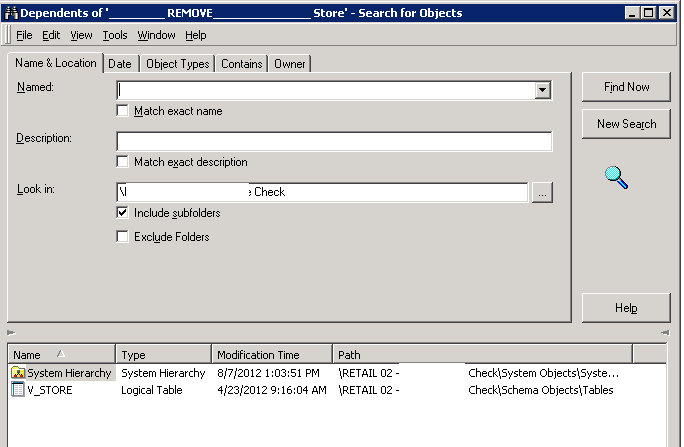
 
Clicking Yes to continue, only System Hierarchy and one logical table is returned, which should not be considered as dependent objects when deleting attributes:
 

ka02R000000kX01QAE_0EM440000002Cy1.png

 
Enabling the 'Display managed objects' option in the Search Editor results in one more managed System Hierarchy as dependent object:

ka02R000000kX01QAE_0EM440000002Cxy.png

 
CAUSE:
 
This is caused by logical metadata inconsistency. In order to track down the cause of the inconsistency, customers encountering this issue should make note of Schema-related changes, Object Migrations, or error messages prior to experiencing the problem.  Change Journal, if it has been enabled, can help in preserving this information. 
 
ACTION:
 
In this particular case, invalid references exist in all three dependent objects. Contact Strategy Technical Support for further assistance. 


Comment

0 comments

Details

Knowledge Article

Published:

April 12, 2017

Last Updated:

April 12, 2017