EducationSoftwareStrategy.com
StrategyCommunity

Knowledge Base

Product

Community

Knowledge Base

TopicsBrowse ArticlesDeveloper Zone

Product

Download SoftwareProduct DocumentationSecurity Hub

Education

Tutorial VideosSolution GalleryEducation courses

Community

GuidelinesGrandmastersEvents
x_social-icon_white.svglinkedin_social-icon_white.svg
Strategy logoCommunity

© Strategy Inc. All Rights Reserved.

LegalTerms of UsePrivacy Policy
  1. Home
  2. Topics

KB42379: An attribute form sorting does not work when drilling on a grid report with dynamic sourcing in MicroStrategy Developer 9.4.x-10.x


Stefan Zepeda

Salesforce Solutions Architect • Strategy


In MicroStrategy Developer 9.4.x-10.x, sorting on an attribute form does not work when drilling on a grid report with dynamic sourcing

SYMPTOM:
In Strategy Developer 9.4.x-10.x, sorting on an attribute form does not work when drilling on a grid report with dynamic sourcing.
 
STEPS TO REPRODUCE:
Follow the steps below to reproduce the issue with the Strategy Tutorial project:
Prerequisite:
A column for sorting is added to the lookup table of Subcategory attribute, as shown below:
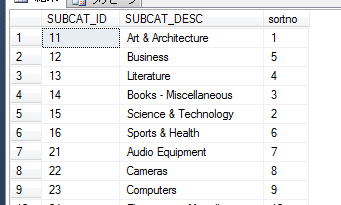
ka02R000000kcSOQAY_0EM440000002CyZ.png

 
Add an attribute form to the Subcategory attribute for report sorting, as shown below:
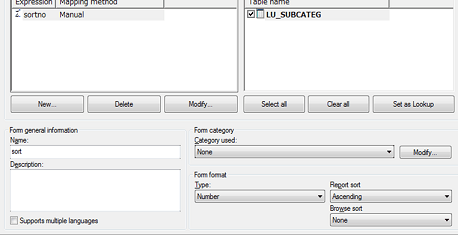
ka02R000000kcSOQAY_0EM440000002CyX.png


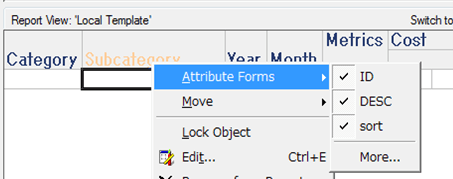
  • Create an Intelligent Cube with the Category, Subcategory, Year, Month attributes and the Cost metric, and enable all the attribute forms for Subcategory, as shown in the image below:
ka02R000000kcSOQAY_0EM440000002CyO.png
  • Create a report and add Subcategory to the Report objects and the other attributes to the local template. Make sure dynamic sourcing is enabled so that the report hits the Intelligent Cube from step 1.
     
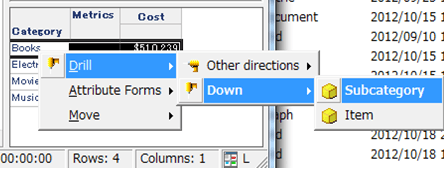
  • Drill down from the ‘Books’ element on Category to Subcategory.
ka02R000000kcSOQAY_0EM440000002CyL.png
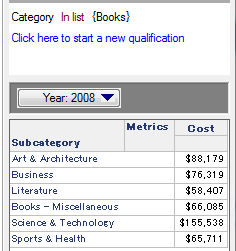
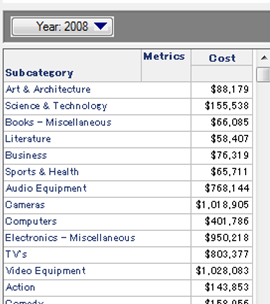
  • Note that the attribute elements are not sorted by the sort form but by ID form, as shown in the image below:
ka02R000000kcSOQAY_0EM440000002CyY.png
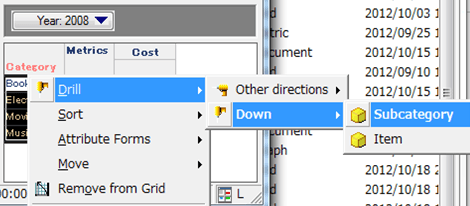
  • Attribute elements sort correctly when drilling down from Category to Subcategory after selecting all rows, as shown in the image below: 
ka02R000000kcSOQAY_0EM440000002Cya.png
ka02R000000kcSOQAY_0EM440000002CyN.png

 
CAUSE:
This is a known issue with Strategy Developer 9.4.x-10.x.
 
ACTION:
Strategy will continue to investigate and post updates as soon as they are available.


Comment

0 comments

Details

Knowledge Article

Published:

April 19, 2017

Last Updated:

April 19, 2017