EducationSoftwareStrategy.com
StrategyCommunity

Knowledge Base

Product

Community

Knowledge Base

TopicsBrowse ArticlesDeveloper Zone

Product

Download SoftwareProduct DocumentationSecurity Hub

Education

Tutorial VideosSolution GalleryEducation courses

Community

GuidelinesGrandmastersEvents
x_social-icon_white.svglinkedin_social-icon_white.svg
Strategy logoCommunity

© Strategy Inc. All Rights Reserved.

LegalTerms of UsePrivacy Policy
  1. Home
  2. Topics

KB423942: How to list all users with email addresses under specific user group with user procedure in Command Manager 9.4.x and above


Tianfeng (Jimmy) Jiang

Quality Engineer, Principal • MicroStrategy


This knowledge base article describes one user procedure to list all users with email addresses under specific user group in Command Manager 9.4.x and above.

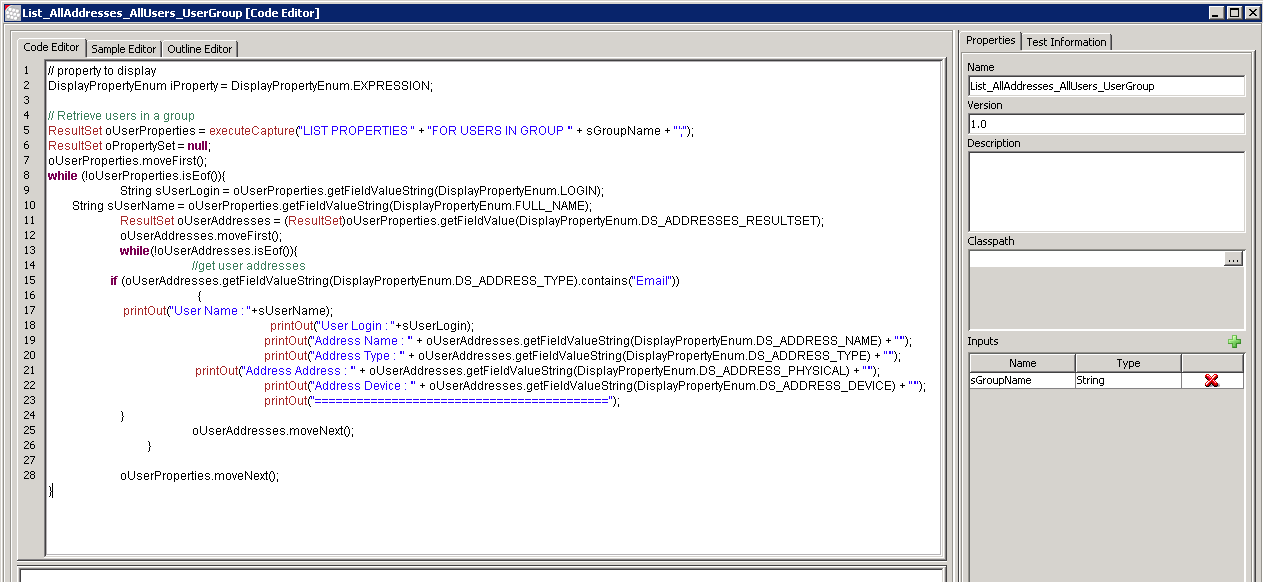
In some scenarios, it is required to list all users with email addresses under specific user group with Command Manager script. This document shows one user procedure which could do the same task as below:
ka02R000000kaITQAY_0EM440000002LW8.png

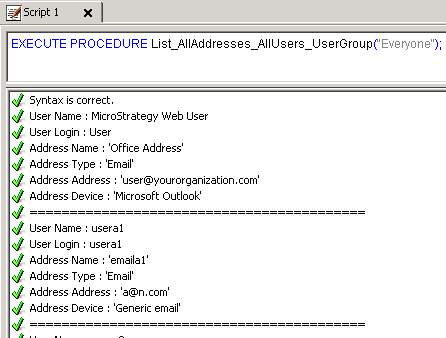
The sample outline of executing this procedure is as below:


EXECUTE PROCEDURE List_AllAddresses_AllUsers_UserGroup("Everyone");
ka02R000000kaITQAY_0EM440000002LW3.png

 
The full procedure file is attached in this article for references.
Note: This procedure is offered as a courtesy by Strategy Technical Support to be used as-is, and cannot assist with modifying it as per user requirements.


Comment

0 comments

Details

Knowledge Article

Published:

May 11, 2017

Last Updated:

May 11, 2017