EducationSoftwareStrategy.com
StrategyCommunity

Knowledge Base

Product

Community

Knowledge Base

TopicsBrowse ArticlesDeveloper Zone

Product

Download SoftwareProduct DocumentationSecurity Hub

Education

Tutorial VideosSolution GalleryEducation courses

Community

GuidelinesGrandmastersEvents
x_social-icon_white.svglinkedin_social-icon_white.svg
Strategy logoCommunity

© Strategy Inc. All Rights Reserved.

LegalTerms of UsePrivacy Policy
  1. Home
  2. Topics

KB423981: Not able to define a translation for a derived attribute created in a VI dashboard via web or via developer in MicroStrategy 10.0-10.4


Danfeng Zhan

Principal Product Specialist • Strategy


This issue has been classified as a defect by MicroStrategy. The impact is limited to derived attribute in dashboard. A code fix for this issue is available in 10.4.4 and 10.8.

SUMMARY
This issue has been classified as a defect by Strategy. The impact is limited to derived attribute in a dashboard. A code fix for this issue is available in Strategy Secure Enterprise 10.4.4 and 10.8.
SYMPTOM
In Strategy 10.0 - 10.4, when creating a new derived attribute within a VI Dashboard, there is no option to define translation.
STEPS TO REPRODUCE
The following steps are based on the Strategy Tutorial project

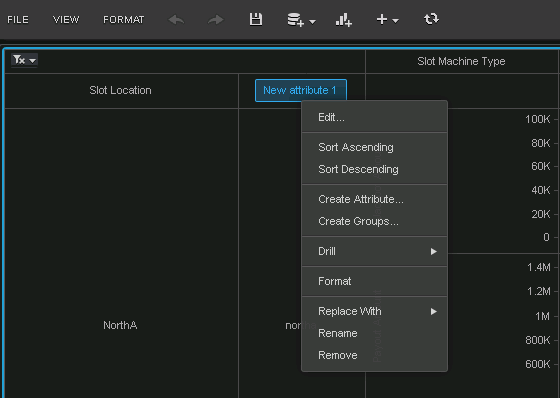
  • Using the out-of-the-box VI Dashboard Casino Analysis, create a new derived attribute called “New attribute 1” with the formula of “Lower([Slot Location]@ID)” as shown below: 
ka044000000kMviAAE_0EM440000002Lmz.png
  • ​


  • It is noticed there is no option to define a translation for it as shown below:
ka044000000kMviAAE_0EM440000002Lmp.png


  • Using Developer the newly created object cannot be found in the object translation list by right-clicking on the dashboard object as shown below:
ka044000000kMviAAE_0EM440000002Lmu.png

CAUSE
This is a known issue with Strategy Secure Enterprise 10.0 – 10.4.
 
ACTION
This issue has been fixed in Strategy 10.4 Hotfix 4 and 10.8. Upgrade to this version to take advantage of the fix.
 
Note: Derived attribute is not present in the dashboard's translation by design. With the fix, it can be searched via components of the dashboard and the translation can be edited
 
Below is the workflow to define the translation of derived attribute created in a dashboard.
 

  1. Right-click the dashboard which has the target derived attribute
  2. Click "Search for Components..." to get all objects in the dashboard
  3. If the derived attribute not in the result, go to the menu in the search windows, Tools -> Options... and check "Display Managed Objects";
  4. If the derived attribute is in the search results, right click it and choose "Translate..." to define translation in the editor.


 Article Reference Number:   KB423981


Comment

0 comments

Details

Knowledge Article

Published:

June 30, 2017

Last Updated:

January 1, 2019