EducationSoftwareStrategy.com
StrategyCommunity

Knowledge Base

Product

Community

Knowledge Base

TopicsBrowse ArticlesDeveloper Zone

Product

Download SoftwareProduct DocumentationSecurity Hub

Education

Tutorial VideosSolution GalleryEducation courses

Community

GuidelinesGrandmastersEvents
x_social-icon_white.svglinkedin_social-icon_white.svg
Strategy logoCommunity

© Strategy Inc. All Rights Reserved.

LegalTerms of UsePrivacy Policy
  1. Home
  2. Topics

KB42404: Services not executing, all are being queued up in the Distribution Manager in MicroStrategy Narrowcast Server, however none are being shown within the Execution Engine


Community Admin

• Strategy


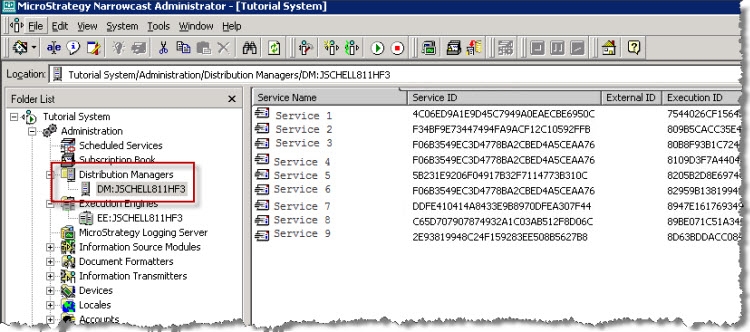
Every service triggered within MicroStrategy Narrowcast Server is being queued in the Distribution Manager while none are been shown in the Execution Engine.
SYMPTOM:
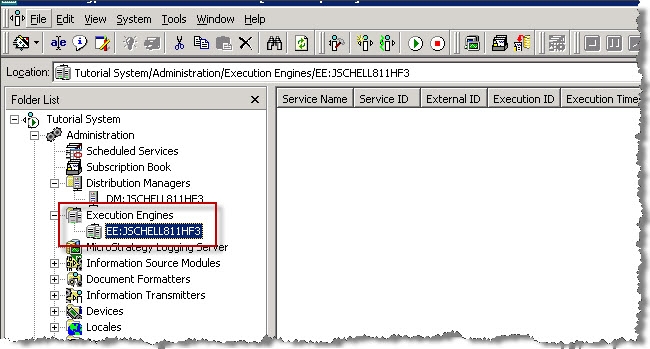
Every service triggered within Strategy Narrowcast Server is being queued in the Distribution Manager while none are been shown in the Execution Engine.
ka04W000000Oh74QAC_0EM4400000029cd.jpeg
ka04W000000Oh74QAC_0EM4400000029cg.jpeg

 
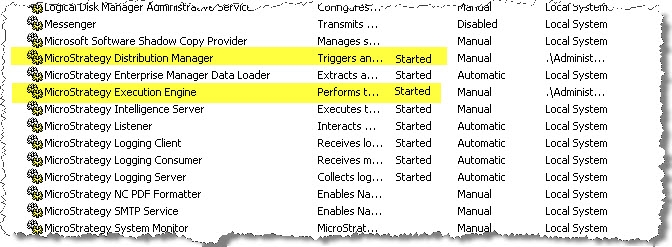
Both Strategy services are running and can be verified as started within the Windows Services Manager.
ka04W000000Oh74QAC_0EM4400000029cQ.jpeg

 
The following error message appears in the DElogs


The Startup or Failover initialization process has determined that there are no usable EEs (available, not idled, with segment capacity > 0).
 
CAUSE:
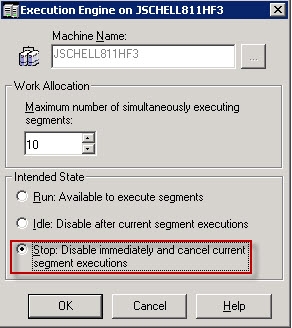
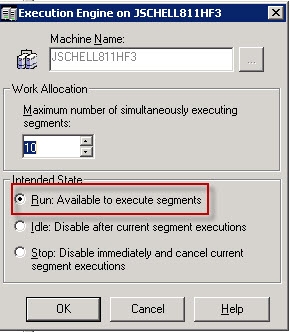
The Execution Engine 'Intended State' was set to 'Stop: Disable immediately and cancel current segment execution'. This state is independent from the actual Windows service (Strategy Execution Engine) which in this case was already up and running.

ka04W000000Oh74QAC_0EM4400000029ch.jpeg

 
ACTION:
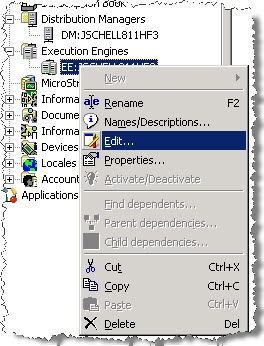
Within the Narrowcast Server Administration select the corresponding Execution Engine, right click > Edit.
ka04W000000Oh74QAC_0EM4400000029cj.jpeg

 
Change the ‘Intended State’ back to ‘Run: Available to execute segments’.
ka04W000000Oh74QAC_0EM4400000029cS.jpeg


Comment

0 comments

Details

Knowledge Article

Published:

June 2, 2017

Last Updated:

June 2, 2017