EducationSoftwareStrategy.com
StrategyCommunity

Knowledge Base

Product

Community

Knowledge Base

TopicsBrowse ArticlesDeveloper Zone

Product

Download SoftwareProduct DocumentationSecurity Hub

Education

Tutorial VideosSolution GalleryEducation courses

Community

GuidelinesGrandmastersEvents
x_social-icon_white.svglinkedin_social-icon_white.svg
Strategy logoCommunity

© Strategy Inc. All Rights Reserved.

LegalTerms of UsePrivacy Policy
  1. Home
  2. Topics

KB424194: How to proceed to download the MicroStrategy Mobile App for iPhone - iPad or Android 10.x installation file for internal distribution


Franklin Silva

Senior Cloud Support Engineer II • MicroStrategy


This Knowledge Base article describes how to proceed in order to obtain a copy of the MicroStrategy Mobile App for iOS or Android for internal distribution

Follow the instructions below based on the desired Mobile platform in order to obtain a copy of the Strategy Mobile App installation file.
Android
File Extension: .apk
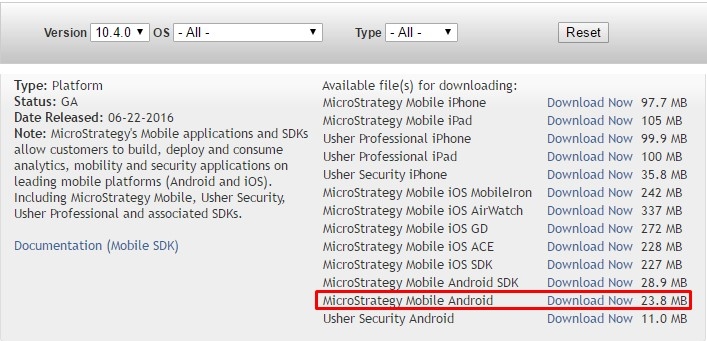
Availability: The installation file is available directly in the Strategy Download page: https://software.microstrategy.com/download. For example: Strategy Mobile App for Android 10.4:
ka044000000kMvoAAE_0EM440000002Mvn.jpeg

iOS
File Extension: .ipa
Availability: Strategy Mobile App for iPhone or iPad is AppConfig compliant. If the Mobile Device Management - MDM vendor is an AppConfig Member, it's possible to pull the Strategy Mobile App from the Apple Store and distribute it via the respective MDM
  KB424194


Comment

0 comments

Details

Knowledge Article

Published:

May 29, 2017

Last Updated:

December 31, 2018