Changes made to attribute forms are not saved for a report using object prompts for its template.
STEPS TO REPRODUCE:
1. Create a new report.
2. Put the "Choose from a list of attributes" onto the template.
3. Select Year attribute and change its form to both ID and Date:
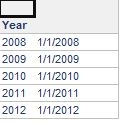
4. Save and close the report. Make sure to save as prompted.
5. Open and run the report again and make sure to pick a different attribute. Save and close.
6. Open and run the report again and select Year attribute again. The attribute forms were not saved.
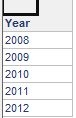
EXPLANATION:
This is by design. Attribute forms are not being saved because the users are prompted by which attribute to be put onto the report, and that report brings in the display settings of the attribute itself.
When the user saves the report as "keep the report prompted", and next time then runs the report again, the user will be prompted to select another attribute. The report will not remember which form you saved because technically the attribute was never on the report.
