EducationSoftwareStrategy.com
StrategyCommunity

Knowledge Base

Product

Community

Knowledge Base

TopicsBrowse ArticlesDeveloper Zone

Product

Download SoftwareProduct DocumentationSecurity Hub

Education

Tutorial VideosSolution GalleryEducation courses

Community

GuidelinesGrandmastersEvents
x_social-icon_white.svglinkedin_social-icon_white.svg
Strategy logoCommunity

© Strategy Inc. All Rights Reserved.

LegalTerms of UsePrivacy Policy
  1. Home
  2. Topics

KB42443: "user ‘XXX’ does not exist Connection String" error message appears when executing a report in MicroStrategy Developer 9.4.x and 10.x against Oracle 11g R2 Data Warehouse.


Stefan Zepeda

Salesforce Solutions Architect • Strategy


"user ‘XXX’ does not exist Connection String" error message appears when executing a report in MicroStrategy Developer 9.4.x and 10.x against Oracle 11g R2 Data warehouse

SYMPTOM:
 
"user ‘XXX’ does not exist Connection String" error message appears when executing a report in Strategy Developer 9.4.x and 10.x against Oracle 11g R2 Data Warehouse, as shown below:


ka02R000000kbFnQAI_0EM440000002Cfz.png


Error: SQL Generation CompleteQueryEngine encountered error: Execute Query failed.
Error type: Odbc error. Odbc operation attempted: SQLExecDirect.
ORA-01918: user ‘TT’ does not exist Connection String:

 
The following steps demonstrate how to reproduce this issue in Strategy Tutorial project:

    • Create a table T1 with column C1 and M1 and table T2 with C1 and M2 in Oracle 11g R2 database. Data type of all the columns is integer.
    • Create a project against this database as Data Warehouse. Edit the database instance and set "Database name" as "TT" in advanced tab as shown below:
ka02R000000kbFnQAI_0EM440000002Cfy.png
    • Create an attribute "C1" mapping to column C1. Create fact "M1" and "M2" mapping to column M1 and M2, respectively. Create Metric "M1" and "M2" mapping to fact M1 and M2, respectively. Create a compound metric M3 with formula "M1/M2".
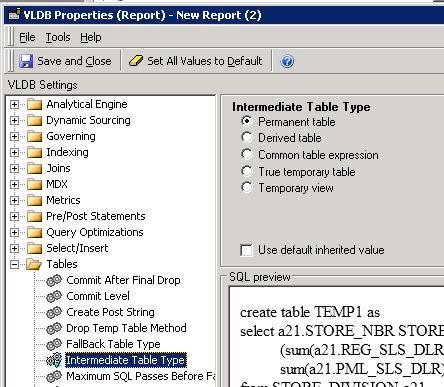
    • Create a report with attribute C1 and Metric M1 and M3. In Data>VLDB Properties>Tables>Intermediate Table Type, set it as "Permanent table" as shown below:
ka02R000000kbFnQAI_0EM440000002CgA.png
    • Execute this report and error message appears as shown below:
ka02R000000kbFnQAI_0EM440000002Cfz.png

CAUSE:
 
The cause for this issue is that database name "TT" does not exist in Data Warehouse. The report with compound metric cannot create intermediate table in this database.
 
ACTION:
 
Enter a valid database name in Intermediate Table Storage section in the Advanced tab in Database Instance editor.
 
Note: for more details about how to create intermediate tables, please refer to the following tech note:
KB3806 (KB5700-007-0054): How to create intermediate tables in MicroStrategy Desktop 9.x table spaces


Comment

0 comments

Details

Knowledge Article

Published:

May 11, 2017

Last Updated:

August 16, 2017