EducationSoftwareStrategy.com
StrategyCommunity

Knowledge Base

Product

Community

Knowledge Base

TopicsBrowse ArticlesDeveloper Zone

Product

Download SoftwareProduct DocumentationSecurity Hub

Education

Tutorial VideosSolution GalleryEducation courses

Community

GuidelinesGrandmastersEvents
x_social-icon_white.svglinkedin_social-icon_white.svg
Strategy logoCommunity

© Strategy Inc. All Rights Reserved.

LegalTerms of UsePrivacy Policy
  1. Home
  2. Topics

KB42447: How to apply conditional logic on a derived metric according to character attribute form in MicroStrategy Developer 9.4.x - 10.x


Stefan Zepeda

Salesforce Solutions Architect • Strategy


This document introduces how to apply conditional logic on a derived metric according to attribute form whose type is character.

This document introduces how to apply conditional logic on a derived metric according to attribute form whose type is character.
For example, if attribute Region is 'Central' then derived metric value should be 'Profit + Cost'.
The following steps describes how to create such derived metric. Tutorial project is used here.
 

ka02R000000kcLXQAY_0EM440000002CgF.png


ka02R000000kcLXQAY_0EM440000002CgL.png
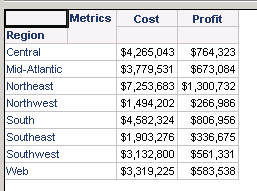
  • Create a report with attribute 'Region', metric 'Revenue', 'Profit' and 'Cost'.
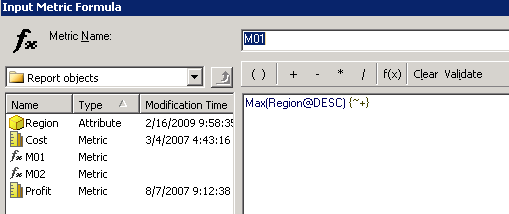
  • Insert a derived metric 'M01' with expression 'Max(Region@DESC) {~+} '.
     
ka02R000000kcLXQAY_0EM440000002CgK.png
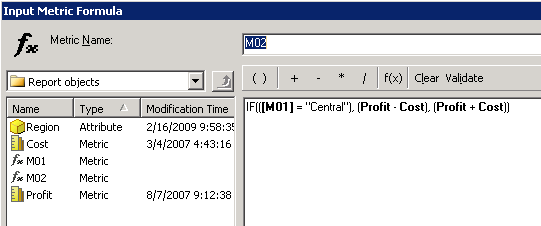
  • Insert another derived metric 'M02' with expression 'IF(( = "Central"), (Profit - Cost), (Profit + Cost))'.
     
ka02R000000kcLXQAY_0EM440000002CgI.png
  • Remove 'M01' from grid.
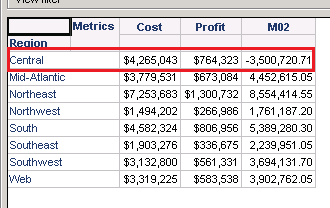
  • Run report. 'M02' gives expect result as shown below.


Comment

0 comments

Details

Knowledge Article

Published:

May 9, 2017

Last Updated:

May 9, 2017