SYMPTOM:
In the Strategy Mobile Admin page in Strategy Mobile 9.3.0, there is an option to choose a custom home screen, which can be the contents of a folder or a specific report or document, like shown below.
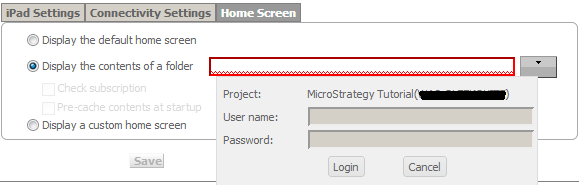
When users try to configure any of these two types of custom home screens and the project authentication has been set to something different than standard authentication, the input text fields are grayed out and if the login button is clicked, the following error appears:

Sample Code/Error
Either your user name or password is incorrect. Please try again. Remember that the password is case sensitive.
STEPS TO REPRODUCE:
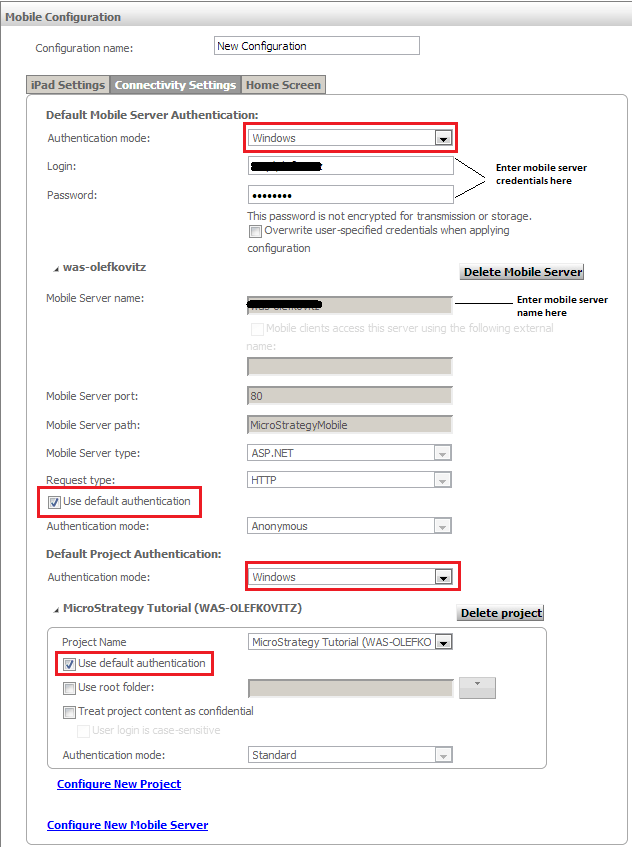
Follow these steps in Strategy Tutorial 9.3.0 to reproduce:
CAUSE:
This is a known issue in Strategy Mobile 9.3.0 where the folder browsing feature for choosing custom home screens only accepts Standard Authentication, and Standard Authentication cannot be used unless it has been previously set as the project authentication mode in the 'Connectivity Settings' tab.
ACTION:
This issue has been addressed in Strategy 9.3.1. Upgrade to take advantage of this fix.
WORKAROUND:
