EducationSoftwareStrategy.com
StrategyCommunity

Knowledge Base

Product

Community

Knowledge Base

TopicsBrowse ArticlesDeveloper Zone

Product

Download SoftwareProduct DocumentationSecurity Hub

Education

Tutorial VideosSolution GalleryEducation courses

Community

GuidelinesGrandmastersEvents
x_social-icon_white.svglinkedin_social-icon_white.svg
Strategy logoCommunity

© Strategy Inc. All Rights Reserved.

LegalTerms of UsePrivacy Policy
  1. Home
  2. Topics

KB42463: Attribute and Metric headers overlap when scrolling horizontally on a grid with locked row and column headers and Object headers set to "No Fill" in Express mode in MicroStrategy Web 9.3.0


Community Admin

• Strategy


This technical note describes a known issue in MicroStrategy Web 9.3.0 where attribute and metric headers overlap when scrolling horizontally on a grid with locked row and column headers and Object headers set to "No Fill" in Express mode. This issue has been addressed in MicroStrategy 9.3.1 and up. Upgrade to take advantage of the fix.

SYMPTOM:
Users configure a grid in a document so All the Grid Cell Header colors are set to "no fill". If in addition to this, the user locks the row and column headers. When the document is run in Express mode in Strategy Web 9.3.0, the grid's headers will overlap while scrolling horizontally or vertically on the metrics, as shown below:
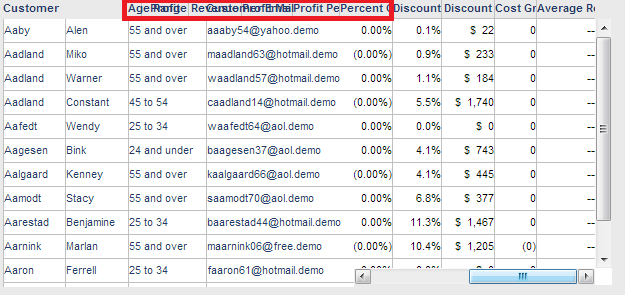
ka04W000000OdsQQAS_0EM4400000026pU.png

STEPS TO REPRODUCE:
Follow these steps in Strategy Tutorial 9.3.0 to reproduce:
  • Create a blank dashboard in Strategy Web and add a grid.
  • Add three attributes to the rows and seven or more metrics to the columns.
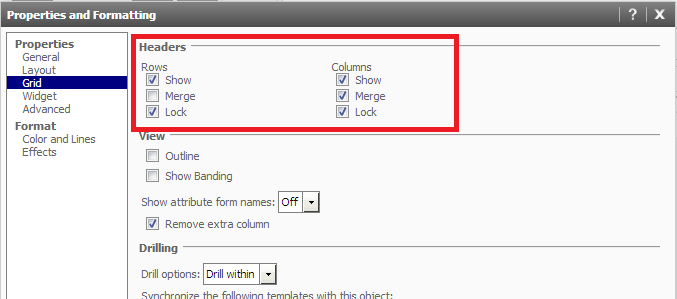
  • Configure the grid with locked headers as seen below:
ka04W000000OdsQQAS_0EM4400000026pV.png
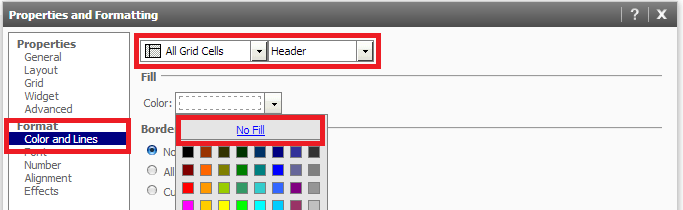
  • Go to Editable Mode, right click the grid, go to Properties and Formatting, and configure All Grid Cell Headers to have No Fill, as seen below:
ka04W000000OdsQQAS_0EM4400000026pQ.png
  • Run the document in Express mode and scroll to the right on the grid. The grid headers will overlap, as seen below:
ka04W000000OdsQQAS_0EM4400000026pU.png

CAUSE:
This is a known issue in Strategy Web 9.3.0. When the cells have no fill, the other cells run behind the attribute headers and appear visible through the transparent background.
ACTION:
This issue has been addressed in Strategy Web 9.3.1 and up. Upgrade to take advantage of the fix.
WORKAROUND:

  1. Add a fill color to the headers cells.
  2. If possible, run the document in Interactive or Flash modes.

Comment

0 comments

Details

Knowledge Article

Published:

June 15, 2017

Last Updated:

June 15, 2017