EducationSoftwareStrategy.com
StrategyCommunity

Knowledge Base

Product

Community

Knowledge Base

TopicsBrowse ArticlesDeveloper Zone

Product

Download SoftwareProduct DocumentationSecurity Hub

Education

Tutorial VideosSolution GalleryEducation courses

Community

GuidelinesGrandmastersEvents
x_social-icon_white.svglinkedin_social-icon_white.svg
Strategy logoCommunity

© Strategy Inc. All Rights Reserved.

LegalTerms of UsePrivacy Policy
  1. Home
  2. Topics

KB42487: Reports that are subscribed to a history list are being saved as a filter instead of a Visual Insight object when creating an analysis in MicroStrategy Web 9.3.0.


Community Admin

• Strategy


This technical note describes an issue in MicroStrategy Web 9.3.0 where reports that are subscribed to a history list are being saved as a filter instead of a Visual Insight object when creating an analysis. This issue has been addressed in MicroStrategy Web 9.3.1. Upgrade to take advantage of the fix.

SYMPTOM: 
When creating a History List Subscription for a report and unchecking the option for "The new scheduled report will overwrite older versions of itself," users cannot create a Visual Insight object off of the subscribed report. When trying to run Visual Insight off of the subscribed report, they end up saving the report as a filter instead of a Visual Insight object. This issue occurs in Strategy Web 9.3.0.
STEPS TO REPRODUCE:
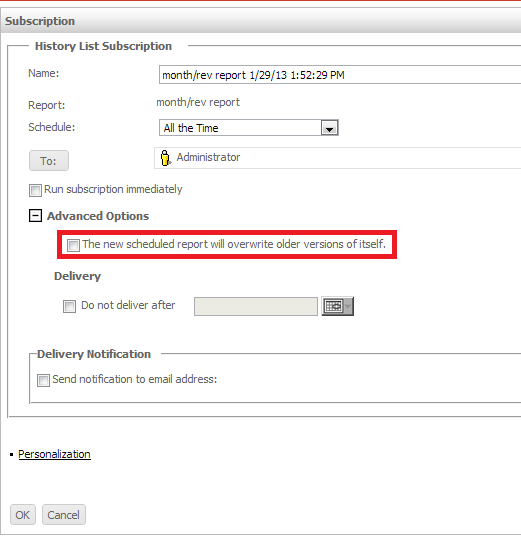
  • Create a History List Subscription for a report.
  • Under Advanced Options, uncheck the option for "The new scheduled report will overwrite older versions of itself", as shown below:
ka04W000000OgYdQAK_0EM4400000026qB.png
  • Access the User's History List.
  • Run the report off of the history list subscription, as shown below:
ka04W000000OgYdQAK_0EM4400000026qA.png
  • Note: The report is archived.
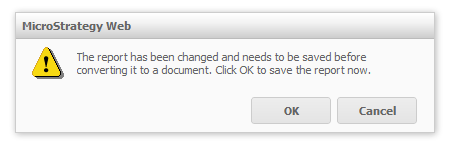
  • After running the report, attempt to create a Visual Insight analysis object off of it. A prompt will appear as shown below:
ka04W000000OgYdQAK_0EM4400000026q3.png
  • 
    The report has been changed and needs to be saved before converting it to a document. Click OK to save the report now.
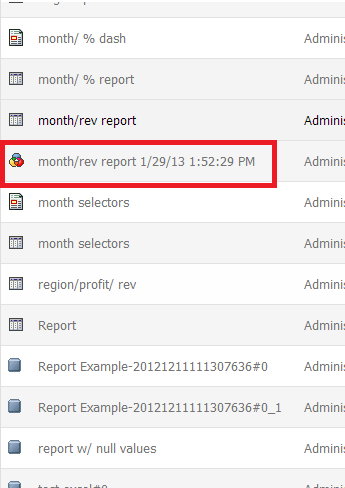

     
  • Save the report and instead of creating the analysis, the user returns back to the report.
  • Navigate to the folder, the report will be saved as a filter object instead of a report object, as shown below:
ka04W000000OgYdQAK_0EM4400000026q9.png

CAUSE:
This is an identified defect in Strategy Web 9.3.0.
ACTION:
This issue is addressed in Strategy Web 9.3.1. Upgrade to this or a later version to take advantage of the fix.


Comment

0 comments

Details

Knowledge Article

Published:

June 14, 2017

Last Updated:

June 14, 2017