SYMPTOM:
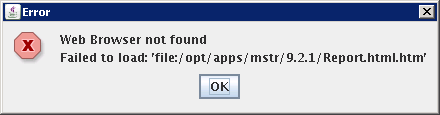
"Web Browser not found" error message appears when trying to run a License Audit report via command line in Strategy 9.2.1 HF9
Run the following command:
./mstrlicmgr -audit -n ProjectSource -u User -p Password -o Report -l log
Error appears:
For more information on running a License Audit in command line please refer to
KB33523: How to generate an audit report through the command line with the MicroStrategy License Manager 9.0.x on Windows and Unix/Linux.
CAUSE:
If a browser is not installed in the PATH environment variable then the error will be seen.
ACTION:
A symbolic link can be created called 'firefox' which is a link to the tcsh shell script (ln -s /bin/tcsh /usr/bin/firefox). By design, even if the browser is installed, it will not be launched.
Another workaround would be to install a browser on the machine and this error will be avoided.
