EducationSoftwareStrategy.com
StrategyCommunity

Knowledge Base

Product

Community

Knowledge Base

TopicsBrowse ArticlesDeveloper Zone

Product

Download SoftwareProduct DocumentationSecurity Hub

Education

Tutorial VideosSolution GalleryEducation courses

Community

GuidelinesGrandmastersEvents
x_social-icon_white.svglinkedin_social-icon_white.svg
Strategy logoCommunity

© Strategy Inc. All Rights Reserved.

LegalTerms of UsePrivacy Policy
  1. Home
  2. Topics

KB42521: Slider selector can be dragged past the last valid attribute element, reaching an "undefined" state that will clear selections on its target object(s) in MicroStrategy Web 9.3.x


Community Admin

• Strategy


A slider selector can be dragged past the last valid attribute element, causing it to reach an "undefined" state that can be seen in the tooltip. In this state, the selector clears selections that have been made on its target object(s) in MicroStrategy Web 9.3.x.

SYMPTOM:
A slider selector can be dragged past the last valid attribute element, causing it to reach an "undefined" state that can be seen in the tooltip. In this state, the selector clears selections that have been made on its target object(s) in Strategy Web 9.3.x.
 
STEPS TO REPRODUCE:

  • Create a report with Day in the rows and Profit in the columns.
  • Create a dashboard with this report as the dataset and insert it as a grid.
  • Right-click on the Day attribute and select "Create Selector Control."
  • In the selector's Properties and Formatting, set it as a slider that allows for multiple selections, as below:
ka04W000000OeA3QAK_0EM4400000026pN.png
  • Select the dataset grid as the selector's target.
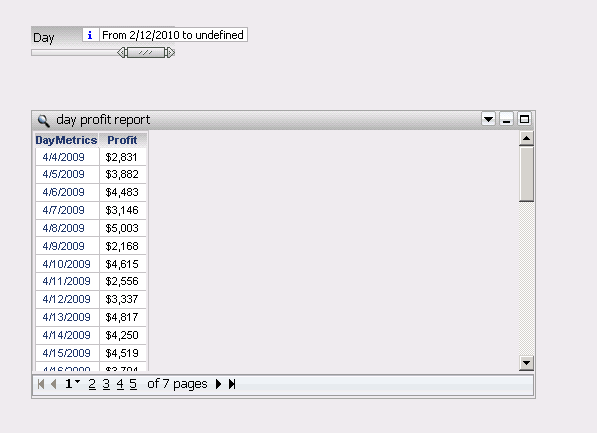
  • Drag the slider all the way to the right, and the selection range in the tooltip, which will show up when the user holds down the mouse click. This issue is inconsistent, so the user may have to extend the lengths of the slider range and/or move the slider itself around before observing the issue. As seen below, the tooltip will show "undefined" in its range: 
ka04W000000OeA3QAK_0EM4400000026pH.png
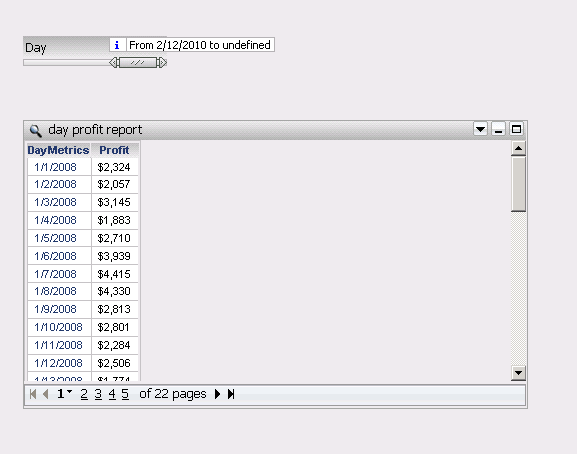
  • Once the user lets go of the mouse click at the undefined state, the graph will not show the current selections, even if the first selection is valid, and will reset to show data from the very first attribute element possible. Notice that below, the selector tooltip begins at 2/12/2010 but the grid begins showing data from 1/1/2008 which is the earliest date in the data.
ka04W000000OeA3QAK_0EM4400000026pF.png

 
CAUSE:
This is a known issue in Strategy Web 9.3.x. This seems to be related to the amount of data or attribute elements used by the selector. If the user reduces the data by using a filter, then the issue is not reproducible anymore.
 
ACTION:
Strategy will continue to investigate and post updates as soon as they are available.
 
WORKAROUND:
Since this issue seems to be related to the amount of data or attribute elements used by the selector, if the user reduces the data by using a filter, then the issue is not reproducible anymore.


Comment

0 comments

Details

Knowledge Article

Published:

June 13, 2017

Last Updated:

June 13, 2017