EducationSoftwareStrategy.com
StrategyCommunity

Knowledge Base

Product

Community

Knowledge Base

TopicsBrowse ArticlesDeveloper Zone

Product

Download SoftwareProduct DocumentationSecurity Hub

Education

Tutorial VideosSolution GalleryEducation courses

Community

GuidelinesGrandmastersEvents
x_social-icon_white.svglinkedin_social-icon_white.svg
Strategy logoCommunity

© Strategy Inc. All Rights Reserved.

LegalTerms of UsePrivacy Policy
  1. Home
  2. Topics

KB42544: Running report as Quick Grid to Microsoft Excel 2010 displays some numeric columns with TEXT cell formatting instead of number formatting for cross tab reports through MicroStrategy Office 9.x


Community Admin

• Strategy


When a user executes a report with more than one cross tab attributes in the columns as Quick Grid in Microsoft Excel 2010, all the cells corresponding to values of the first metric will be formatted as Text even if the metric values are numeric, in MicroStrategy Office 9.x.

SYMPTOM:
 
When a user executes a report with more than one cross tab attributes in the columns as Quick Grid in Microsoft Excel 2010, all the cells corresponding to values of the first metric will be formatted as Text even if the metric values are numeric, in Strategy Office 9.x, like shown below:
 

ka04W000000Oe0aQAC_0EM4400000026p1.jpeg

 
Similarly, if the values for the first metric spread through several columns all the columns that corresponding to that first metric in the Quick Grid will be formatted as text, like shown below:
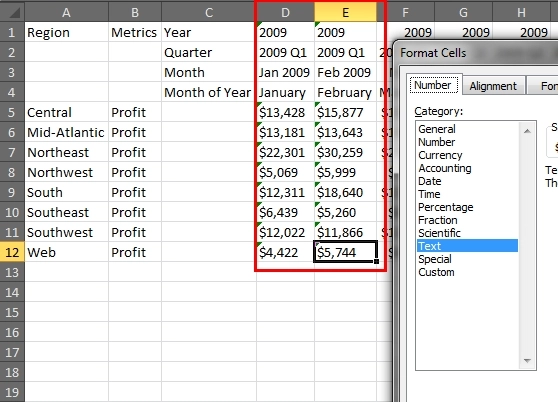
 

ka04W000000Oe0aQAC_0EM4400000026oz.jpeg

 
CAUSE:
 
This was observed in Strategy Office 9.x due to the presence of cross tab attributes in the Quick Grid.
 
WORKAROUND:
 
If possible, run the report as Flattened instead of Cross tabs, like shown below:
 

ka04W000000Oe0aQAC_0EM4400000026ox.jpeg

 
Note: this will flatten the report and prevent cross tabbing.


Comment

0 comments

Details

Knowledge Article

Published:

June 14, 2017

Last Updated:

June 14, 2017