EducationSoftwareStrategy.com
StrategyCommunity

Knowledge Base

Product

Community

Knowledge Base

TopicsBrowse ArticlesDeveloper Zone

Product

Download SoftwareProduct DocumentationSecurity Hub

Education

Tutorial VideosSolution GalleryEducation courses

Community

GuidelinesGrandmastersEvents
x_social-icon_white.svglinkedin_social-icon_white.svg
Strategy logoCommunity

© Strategy Inc. All Rights Reserved.

LegalTerms of UsePrivacy Policy
  1. Home
  2. Topics

KB42562: "The connection failed. Possible causes are a)Server is not running, b)Server is loading project, c) Network problem, or ..." error message appears when editing attachments in the Narrowcast Server Service Wizard in MicroStrategy 9.x - 10.x


Community Admin

• Strategy


In the MicroStrategy Narrowcast Service Wizard, when the user clicks "Define Attachment" under "Message Content", the following error is displayed: "The connection failed. possible causes are a)Server is not running, b)server is loading project, c) Network problem, or d) Server reached maximum connection limit."

SYMPTOM:
In the Strategy Narrowcast Service Wizard, when the user clicks "Define Attachment" under "Message Content", the following error is displayed:

ka04W000001MKvAQAW_0EM4400000029e7.png


The connection failed. possible causes are a)Server is not running, b)server is loading project, c) Network problem, or d) Server reached maximum connection limit.
CAUSE:
One scenario where this error can occur is if the Narrowcast Server is pointing to a wrong Intelligence Server.
ACTION:
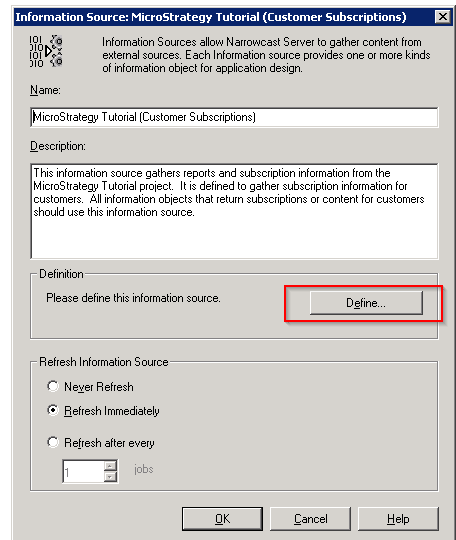
From the Narrowcast Administrator, go to Administration > Information Source Modules and select the Information Source that is being used by the service. Right- click to go to edit mode and select "Define" as shown below.

ka04W000001MKvAQAW_0EM4400000029e5.png

This will open the Information Source Wizard where the user can check the Intelligence Server information. Make sure that the Intelligence Server information is correct and re-configure the Information Source.
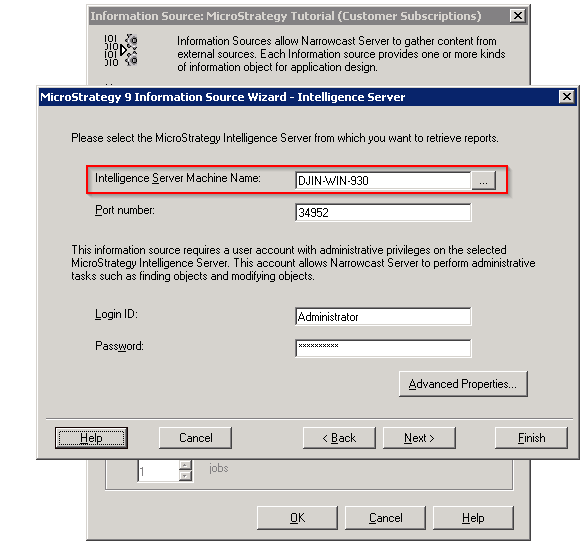
ka04W000001MKvAQAW_0EM4400000029e4.png


Comment

0 comments

Details

Knowledge Article

Published:

April 3, 2017

Last Updated:

April 3, 2017