SYMPTOM:
Users attempt to change the Form category -> Category used: within an attribute form but notice it is grayed out. There is no way to make the desired modification as seen below:

CAUSE:
This is by design whenever the attribute form is used within freeform SQL reports. If that form category is used within a freeform SQL report, the category cannot be modified within the attribute editor because it would effect the freeform SQL reports definition as well.
ACTION:
In order to modify the form category used, the following steps can be used:
1. Identify the freeform SQL reports linked to the form within the attribute editor and edit them
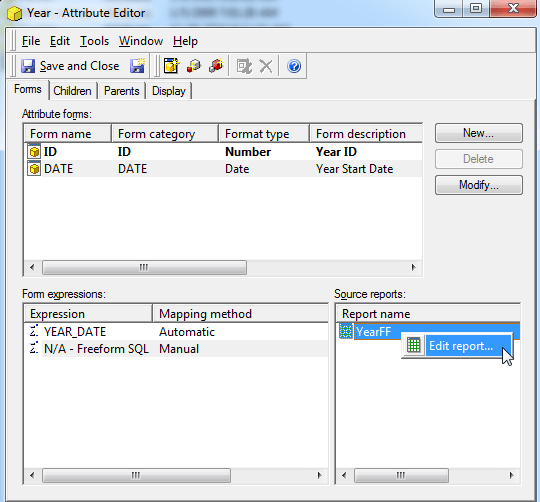
2. Navigate into the freeform SQL editor
3. Remove the attribute form in which the form category used is needing to be modified

4. Save and Close the freeform SQL report
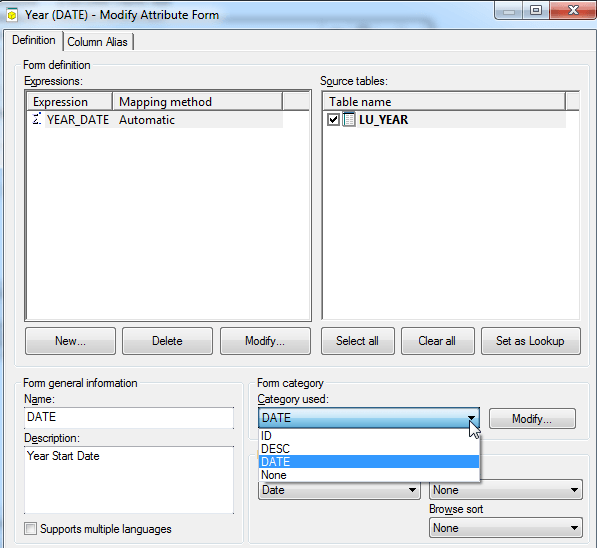
5. Edit the attribute and modify the form
6. The form category used can now be modified since there are no freeform SQL reports linked to the form
7. The attribute form desired can then be added back into the freeform SQL reports definition
