EducationSoftwareStrategy.com
StrategyCommunity

Knowledge Base

Product

Community

Knowledge Base

TopicsBrowse ArticlesDeveloper Zone

Product

Download SoftwareProduct DocumentationSecurity Hub

Education

Tutorial VideosSolution GalleryEducation courses

Community

GuidelinesGrandmastersEvents
x_social-icon_white.svglinkedin_social-icon_white.svg
Strategy logoCommunity

© Strategy Inc. All Rights Reserved.

LegalTerms of UsePrivacy Policy
  1. Home
  2. Topics
  3. KB425802: MicroStrategy 10.8 and above: How to configure SAML support for IIS using a third party Shibboleth Service Provider Version2.

KB425802: MicroStrategy 10.8 and above: How to configure SAML support for IIS using a third party Shibboleth Service Provider Version2.


Carlos Rodriguez

Senior Cloud Support Engineer III • MicroStrategy


This document describes how to configure MicroStrategy ASP Web to support SAML using Shibboleth Service Provider for IIS. Attempting to access /MicroStrategy or /MicroStrategyMobile should redirect the user to first authenticate. If any problems arise see section on Troubleshooting. When setup successfully, it is recommended to follow Shibboleth's chapter on Productionalization.

SUMMARY:

This document describes how to configure MicroStrategy ASP Web to support SAML using Shibboleth Service Provider for IIS. Attempting to access /MicroStrategy or /MicroStrategyMobile should redirect the user to first authenticate. If any problems arise see section on Troubleshooting. When setup successfully, it is recommended to follow Shibboleth's chapter on Productionalization.
Starting with MicroStrategy ASP Web 2019, Shibboleth Service Provider version 3 is supported for SAML authentication. See Enabling Single Sign-On with SAML Authentication for ASP Web and Mobile  for more information.

ACTION:

Shibboleth Service Provider Installation

  1. Install Shibboleth Service Provider Version 2:
    • http://shibboleth.net/downloads/service-provider/
  2. Follow installation instructions from Shibboleth for your version of IIS:
    1. Users can find more information regarding installation Shibboleth on their wiki page.
      • https://wiki.shibboleth.net/confluence/display/SHIB2/NativeSPWindowsInstall
    2. After installation, users needs to verify the following
      • ISAPI filter. Added the isapi_shib.dll as an ISAPI filter to IIS. Configured for the whole server, or site (typically "Default Web Site") associated with MicroStrategy applications.

ka04W000001IsP0QAK_0EM440000002SKa.png

  • Handled mapping. Added isapi_shib.dll to handle * .sso extension. Should be configured for the site (typically "Default Web Site") associated with MicroStrategy applications. It should be a script mapping.
ka04W000001IsP0QAK_0EM440000002SKp.png

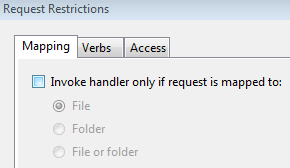
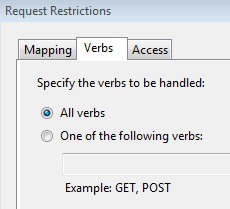
  • Also ensure that handler mapping request restrictions are appropriately configured, i.e no mapping restrictions, no verb restrictions:
ka04W000001IsP0QAK_0EM440000002SKz.png
ka04W000001IsP0QAK_0EM440000002SL4.png

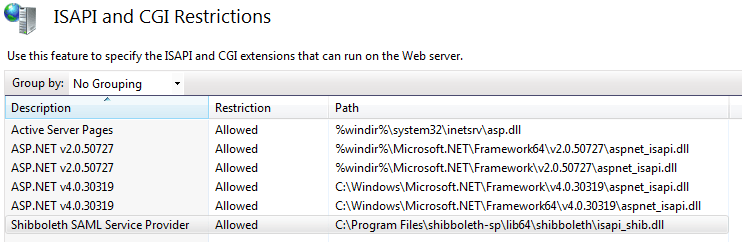
  • Permission: Ensure that isapi_shib.dll is in the list of permitted extensions. Top level IIS options "ISAPI and CGI Restrictions".
ka04W000001IsP0QAK_0EM440000002SL9.png

  1. Verify Installation. Note this must be run as "localhost", and should return XML containing information about Shibboleth:
    • https://localhost/Shibboleth.sso/Status


Shibboleth Service Provider Configuration

  1. Shibboleth SP Configuration. Use instructions below along with https://wiki.shibboleth.net/confluence/display/SHIB2/Configuration.
    1. Configure %SHIBBOLETH_INSTALL_DIR%\etc\shibboleth\shibboleth2.xml
      • Replace site name with any qualified site name:

shibboleth2.xml - site

<Site id="1" name="sp.example.org"/>
with
<Site id="1" name="FULLY_QUALIFIED_SERVICE_PROVIDER_HOST_NAME"/>

  • Replace host name with fully qualified name, and path(s):

shibboleth2.xml - host

<Host name="sp.example.org">
  <Path name="secure" authType="shibboleth" requireSession="true"/>
</Host>
with
<Host name="FULLY_QUALIFIED_SERVICE_PROVIDER_HOST_NAME">
  <Path name="MicroStrategy" authType="shibboleth" requireSession="true"/>
  <Path name="MicroStrategyMobile" authType="shibboleth" requireSession="true"/>
</Host

  • Replace entityID value with a suitable entity name for your new Service Provider, and make a note of it as it will be required by the Identity Provider:

shibboleth2.xml - entityID

<SSO entityID="https://idp.example.org/idp/shibboleth"
     discoveryProtocol="SAMLDS" discoveryURL="https://ds.example.org/DS/WAYF">
       SAML2 SAML1
</SSO>
with the following (note that discoveryProtocol and discoveryURL is only required with Shibboleth Identity Provider),
<SSO entityID="YOUR_SSO_SAML_ENTITY_ID">
  SAML2 SAML1
</SSO>
  • Obtain Identity Provider metadata.
    • URL option (recommended). If IdP exposes a metadata endpoint, this is the preferred solution, otherwise see File option below. Add the following declaration below the commented out <MetadataProvider> section:

shibboleth2.xml - IdP metadata

<MetadataProvider
  type="XML"
  url="https://adfs.example.org/federationmetadata/2007-06/federationmetadata.xml"/> 
  • File option. Copy it to the file %SHIBBOLETH_INSTALL_DIR%\etc\shibboleth\partner-metadata.xml. Uncomment the following declaration in shibboleth2.xml:

shibboleth2.xml - IdP metadata

<MetadataProvider
  type="XML"
  file="partner-metadata.xml"/> 

  1.  Configure %SHIBBOLETH_INSTALL_DIR%\etc\shibboleth\attribute-map.xml to extract several fields from the SAML assertion, which MicroStrategy will associate with an Intelligence Server user.
    • Add the <Attribute> mappings under <Attributes> root. Shibboleth will look for this assertion attribute and map it to the HTTP header SBUSER for the MicroStrategy application to consume. Here is a configuration for AD FS where we read the windows account name claim. This must be consistent with the Identity Provider claim mapping that will be configured later.

attribute-map.xml user mapping - AD FS

<Attribute
  name="http://schemas.microsoft.com/ws/2008/06/identity/claims/windowsaccountname"
  id="SBUSER"/>​
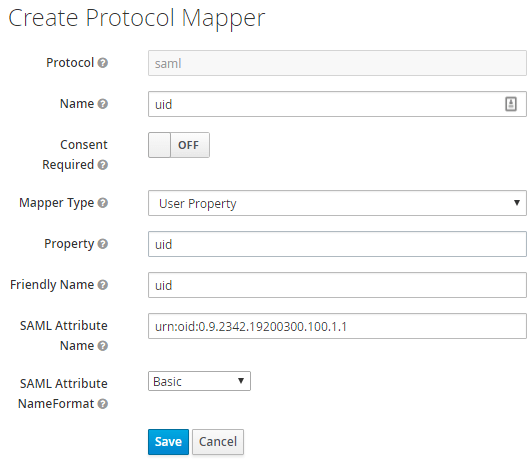
  • Here is a sample configuration for Keycloak, where we are reading the "urn:oid:0.9.2342.19200300.100.1.1" or uid claim :

attribute-map.xml user mapping

<Attribute
  name="urn:oid:0.9.2342.19200300.100.1.1"
  id="SBUSER"
  nameFormat="urn:oasis:names:tc:SAML:2.0:attrname-format:basic"/>

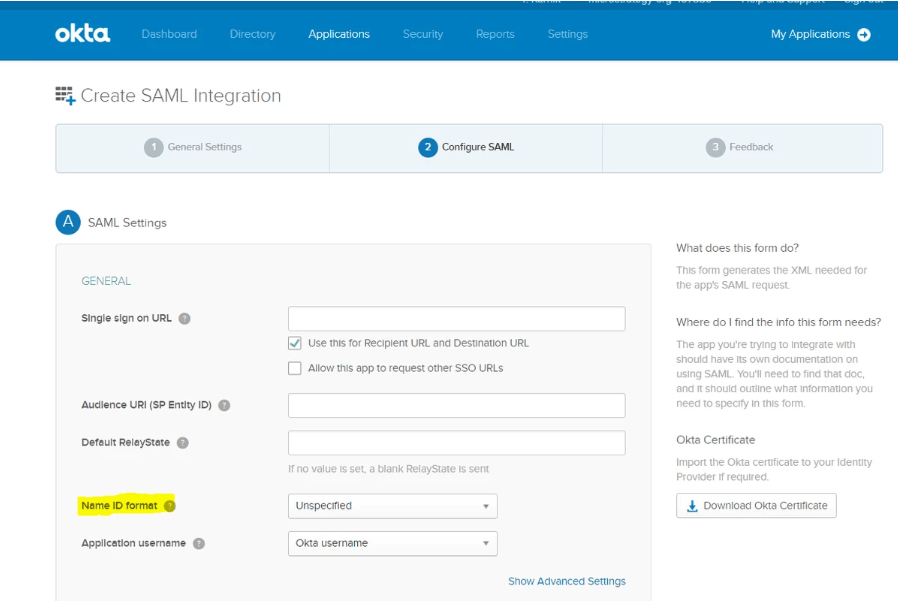
Here is a sample configuration for Okta. Make sure you match the nameid-format in the attribute-map.xml with the Name ID format in the Configure SAML settings on Okta:
 

attribute-map.xml user mapping

<Attribute  name="urn:oasis:names:tc:SAML:1.1:nameid-format:unspecified"  id="SBUSER"/>

ka04W000001IsP0QAK_0EM44000000WYDW.png
In IDP Metadata, the Name ID format can be found:
<md:NameIDFormat>urn:oasis:names:tc:SAML:1.1:nameid-format:unspecified</md:NameIDFormat>
 
  • It is also recommended to comment out the unused <Attribute> declarations in attribute-map.xml.
  1. Restart the following services:
  • Shibboleth 2 Daemon. May be done with Windows services, or Windows Command Prompt:

c:\> net stop shibd_default
c:\> net start shibd_default

  • World Wide Web Publishing Service. May be done with Windows services, or Windows Command Prompt:

c:\> net stop w3svc
c:\> net start w3svc

  1. Verify XML is returned from https://localhost/Shibboleth.sso/Status again. Also, ensure the Application entityID and MetadataProvider source values are correctly configured from previous steps.

Identity Provider Configuration

It is necessary to (1) add the Service Provider configured above as a new client in the SAML Identity Provider (e.g. AD FS), and (2) ensure that the user login/uid is also included in the SAML Assertion. Some guidance is provided below for several Identity Providers - refer to their documentation for adding new clients/relying parties for details. 

AD FS

  1. Run the Microsoft Windows Server Manager. Under Tools, find and run "AD FS Management".
  2. Expand to the following: AD FS > Trust Relationships > Relying Party Trusts.
  3. Click "Add Relying Party Trust..." wizard.
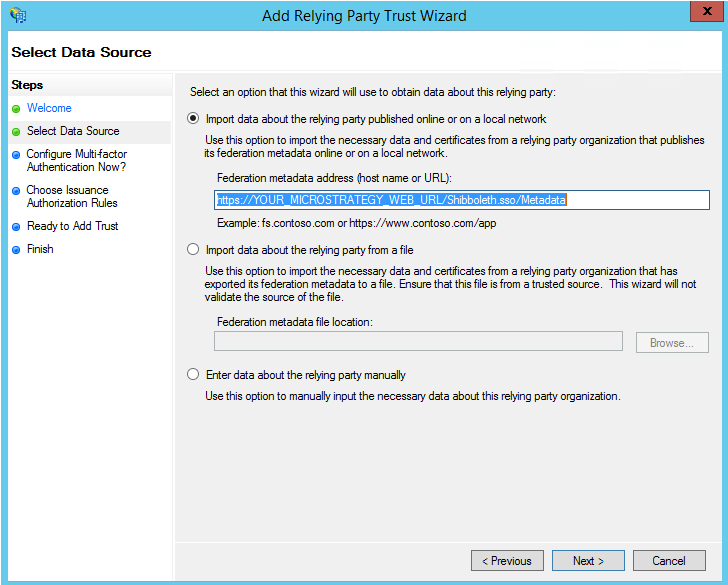
  4. When you reach the "Select Data Source" option, you will require the Shibboleth Service Provider metadata.
    1. https://YOUR_MICROSTRATEGY_WEB_URL/Shibboleth.sso/Metadata
ka04W000001IsP0QAK_0EM440000002SLE.png

  1. Replace YOUR_MICROSTRATEGY_WEB_URL accordingly.
  2. If the http URL metadata does not work, you may have to manually download and upload the metadata file.
  1. For "Display name" it is recommended you use YOUR_MICROSTRATEGY_WEB_URL.
  2. When finished you may be prompted to edit claim rules. If not, you can right click your new client and select "Edit claim rules...".
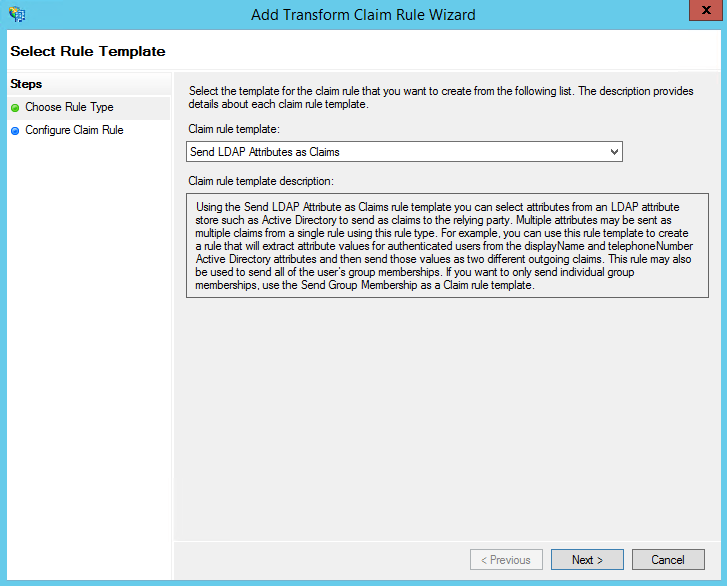
  3. Click "Add Rule..." under the tab "Issuance Claim Rules", which will bring up the "Add Transform Rule Claim Wizard".
ka04W000001IsP0QAK_0EM440000002SLO.png

  1. Assuming your AD FS is backed by LDAP, select "Send LDAP Attributes as Claims" otherwise please refer to AD FS documentation.
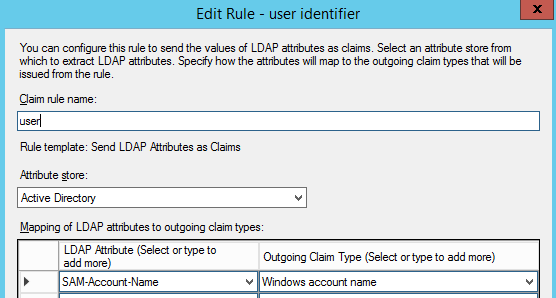
  2. Claim rule name: user
    Attribute store: Active Directory
    Mapping: LDAP Attribute=SAM-Account-Name, Outgoing Claim Type=Windows account name
ka04W000001IsP0QAK_0EM440000002SLT.png
Note that this declaration has to be consistent with the Shibboleth attribute-map.xml configuration from above. 

    Keycloak

    The Identity Provider will need ensure the user identity (i.e. id/username/login) field is also included in the SAML assertion generated when a user is authenticated. The exact field depends upon the Identity Provider. The user identity will be associated with the SAML parameter name of "urn:oid:0.9.2342.19200300.100.1.1". Note that this parameter must be consistent with the parameter with the same name in the Shibboleth Service Provider attribute-map.xml declaration.
    ka04W000001IsP0QAK_0EM440000002SLY.png

    Okta
    To configure SAML with Okta, refer to How to integrate Okta with out of the box MicroStrategy SAML

    To get the Single Sign-On URL, use the Shibboleth Metadata which can be retrieved from the URL https://"FULLY_QUALIFIED_SERVICE_PROVIDER_HOST_NAME"/Shibboleth.sso/Metadata
     

    MicroStrategy Integration

    Integration with MicroStrategy ASP Web

    1. Setup Trust relationship between MicroStrategy Web and Intelligence Server.
      1. https://localhost/MicroStrategy/asp/Admin.aspx
      2. Under Intelligence Servers > Servers
      3. For each Intelligence Server, go to Properties > Modify
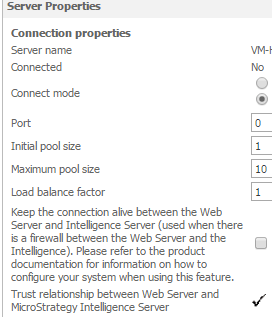
      4. Click on Setup associated with "Trust relationship between Web Server and MicroStrategy Intelligence Server". Enter credentials. When successfully setup, there should be a check mark next to the trust.
    ka04W000001IsP0QAK_0EM440000002SLd.png

    1. Enable "Trusted Authentication Request" login mode.
    2. Under "Trusted Authentication Provider" select "Custom SSO".
    3. Configure C:\Program Files (x86)\MicroStrategy\Web ASPx\WEB-INF\classes\resources\custom_security.properties parameter LoginParam with same value associated with the user mapped from the SAML assertion - note reference to previously configured attribute mapping of "SBUSER":

    LoginParam=SBUSER


    MicroStrategy User Mapping

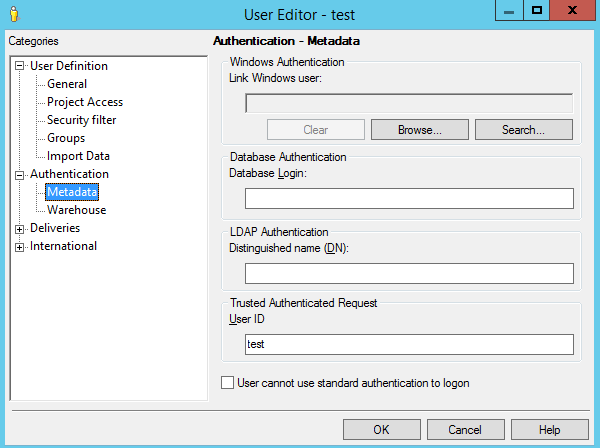
    1. MicroStrategy Developer > User Manager > Edit User Properties > Authentication > Trusted Authentication Request > User ID.
    ka04W000001IsP0QAK_0EM440000002SLi.png

    Intelligence Server Administration Portal on MicroStrategy Web

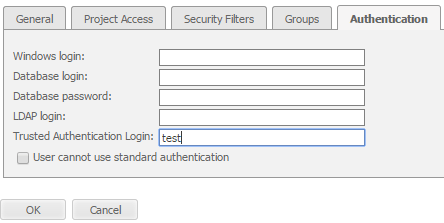
    1. MicroStrategy Web > Intelligence Server Administration Portal > User Manager > Edit User Properties > Authentication > Trusted Authentication Login.
    ka04W000001IsP0QAK_0EM440000002SLs.png

    Troubleshooting

    Cause

    Problem

    Recommendation

    Shibboleth Service Provider
     

    Shibboleth installation not properly configured

    https://localhost/Shibboleth.sso/Status returns a 404.

    Check: Shibboleth Service Provider Setup > Installation > #2

    shibboleth2.xml service provider not properly configured

    Not seeing SAML login, and seeing MicroStrategy Web directly.


    Check: Shibboleth Service Provider Setup > Configuration > 1.a.i & 1.a.ii

    shibboleth2.xml identity provider not properly configured

    Shibboleth complains it cannot find Identity Provider metadata:

    Image

    Check: Shibboleth Service Provider Setup > Configuration > 1.a.iv & 1.a.v

    MicroStrategy Web

    Trust not established between MicroStrategy Web/Mobile and Intelligence Server

    Image

    See MicroStrategy Integration >

    Integration with MicroStrategy ASP Web > 1

    Trusted Authentication not enabled

    After logging in via SAML you are presented with yet another login page from MicroStrategy Web.

    Ensure that Trusted Authentication is enabled (requires MicroStrategy user with Administrator privileges). For a seamless Single-Sign-On experience, ensure that Trusted Authentication is also the Default mode.


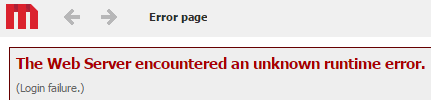
    After SAML login, MicroStrategy returns a "Login failure" error:

    Image

    See "Troubleshooting Login Failure" section below.


    Troubleshooting Login Failure

    ka04W000001IsP0QAK_0EM440000002SMl.png
    The error above may be caused by configuration issues at any one or more of the following components: Identity Provider, Shibboleth Service Provider, MicroStrategy Web, MicroStrategy Intelligence Server. Our goal is to narrow down the cause - proceed through each verification step starting from #1:


    Troubleshooting Login Failure

    Verification Step

    Component

    How to check if working properly?

    Recommendation if not configured

    #1

    Identity Provider

    • Install Chrome browser.
      • Install "SAML Chrome Panel" extension.
    • Open a new incognito window.
    • Enable "More tools > Developer tools".
    • Under Developer tools, select the SAML tab (you may have to click on the ">>" button.
    • Access MicroStrategy Web where the Shibboleth SAML Service Provider is configured, and login via SAML.
    • After successful SAML login, examine the Chrome SAML Panel.
    • If you see EncryptedAssertion you will need to temporarily disable SAML encryption. It is suggested you first save the encryption certificate before removing it. When troubleshooting is over, the encryption may be re-enabled by associating it with the encryption certificate.
      • AD FS. Run Server Manager > Tools > AD FS Management. Edit your client under AD FS > Trust Relationships > Relying Party Trusts. Go to Encryption tab. View the certificate first in order to save it, then remove it from the client.
    • Check SAML Assertion for the attribute that was previously mapped in the Identity Provider. Here's an example from AD FS where we mapped Windows account name:

    Check: SAML Identity Provider Configuration > Configure Assertion Parameter uid Mapping.

    Check your Identity Provider documentation on how to setup attributes in your SAML asssertions.

    #2

    Shibboleth Service Provider

    After SAML login, proceed to:
    https://YOUR_MICROSTRATEGY_WEB_URL/Shibboleth.sso/Session

    Replace YOUR_MICROSTRATEGY_WEB_URL accordingly. Here's a sample response:
    Image

    Did it contain the SBUSER parameter under Attributes? If yes, then it means the Shibboleth Service Provider is properly configured - proceed to next verification step. If missing, see next column for recommendations.

    Check: Shibboleth Service Provider Setup > Configuration > 1.b

    Also ensure you restart services: Shibboleth Service Provider Setup > Configuration > 1.c

    #3

    MicroStrategy Web

    See recommendations column.

    Check: MicroStrategy Integration >
    Integration with MicroStrategy ASP Web > 4

    #4

    MicroStrategy Intelligence Server

    Make sure you have a user mapped with the same SAML Attribute observed in step #1, See recommendation column.

    Check: MicroStrategy Integration > MicroStrategy User Mapping


    THIRD PARTY SOFTWARE INSTALLATION WARNING:

    The third-party product(s) discussed in this technical note is manufactured by vendors independent of MicroStrategy. MicroStrategy makes no warranty, express, implied or otherwise, regarding this product, including its performance or reliability.
     KB425802

    Comment

    0 comments

    Details

    Knowledge Article

    Published:

    October 28, 2021

    Last Updated:

    January 31, 2024