EducationSoftwareStrategy.com
StrategyCommunity

Knowledge Base

Product

Community

Knowledge Base

TopicsBrowse ArticlesDeveloper Zone

Product

Download SoftwareProduct DocumentationSecurity Hub

Education

Tutorial VideosSolution GalleryEducation courses

Community

GuidelinesGrandmastersEvents
x_social-icon_white.svglinkedin_social-icon_white.svg
Strategy logoCommunity

© Strategy Inc. All Rights Reserved.

LegalTerms of UsePrivacy Policy
  1. Home
  2. Topics

"Object with ID ‘xxx’ and type 29 (DB Instance) is not found in the metadata. It may have been deleted.” message occurs when trying to create a DSN with an ampersand in the password


Community Admin

• Strategy


Description

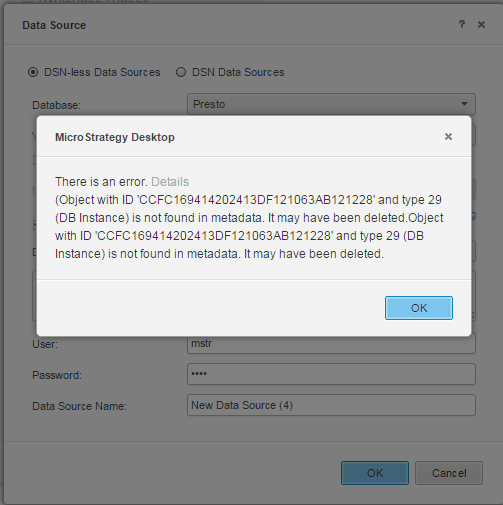
This knowledge base article describes an issue where users cannot use an ampersand in the password when trying to create a new data source (DSN) in Strategy Analytics Desktop. When attempting to create the password, users receive this message:
"Object with ID ‘xxx’ and type 29 (DB Instance) is not found in the metadata. It may have been deleted.”
ka04W00000148B0QAI_0EM440000002RVw.png


Steps to reproduce

  • Install Strategy Analytics Desktop on a Mac or Windows.
  • Add external data of your choice.
  • Select one of the Database options.
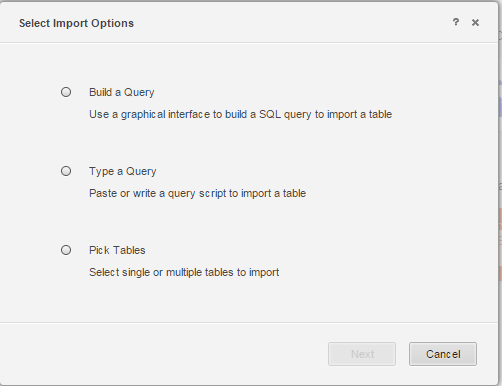
  • Select one of the import options.

    View the image below for reference:

ka04W00000148B0QAI_0EM440000002RW6.png
  • Add a new data source. 

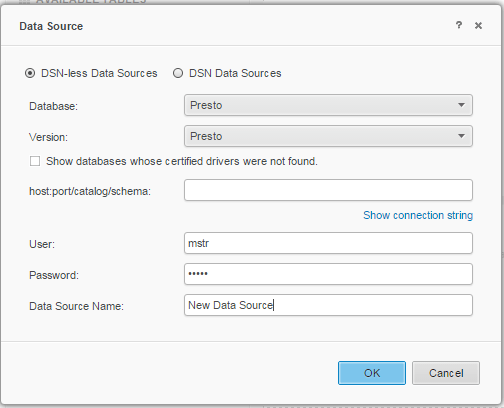
    Give the database information and use a fake password that contains an ampersand (&).

    View the image below for reference:


ka04W00000148B0QAI_0EM440000002RWG.png


  1. Click OK.
     

Why is this happening?

This is a known issue with Strategy Analytics Desktop 10.x.
Our engineers are working to enhance the overall Strategy experience.

Solution


Currently this issue is still being reviewed for feasibility by our Technology team. Please refer back to this article for all updates.
In the meantime, we advise the users do not use an ampersand (&) within the password.


Comment

0 comments

Details

Knowledge Article

Published:

December 29, 2017

Last Updated:

September 4, 2019