SYMPTOM
When executing a Distribution Services subscription where the option to "Compress contents" is enabled, the subscription execution fails, and the following error can be seen in the DSSErrors.log:
[Distribution Service][Error] Transformation initialization failed: Failed to dynamically load library 'MPZipTrf'. (Server message 305419896) The specified module could not be found. (Windows API error 126)

CAUSE
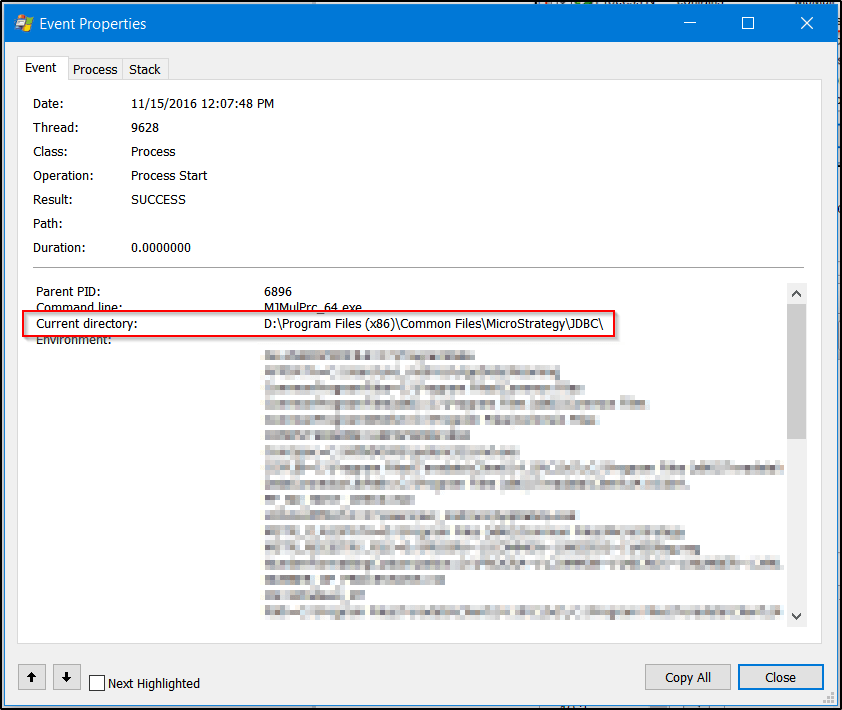
This behavior is caused by a known defect that changes the Intelligence Server's working directory to the wrong path while the Intelligence Server is running. Typically the working directory will be changed from the Intelligence Server's installation folder to Strategy's JDBC driver folder (by default C:\Program Files (x86)\Common Files\MicroStrategy\JDBC). In order to confirm that the working directory has been changed, Microsoft Process Monitor can be used to check the working directory of newly created MJMulPrc processes when the subscription runs. To capture these events, add filters for Operation is Process Start and Process Name contains MJMulPrc:

Then, open one of the captured events and check the Current directory parameter. In a normally working scenario, it is expected that this will show C:\Program Files (x86)\MicroStrategy\Intelligence Server (or the particular location the Intelligence Server was installed to). When the known issue is occurring, this will show the Program Files (x86)\Common Files\MicroStrategy\JDBC directory instead, as in the below screenshot:
ACTION
This issue has been fixed in Strategy Secure Enterprise 10.8 and 10.4 Hotfix 4. Upgrade to one of the applicable versions to take advantage of the fix.
WORKAROUND
Restarting the affected Strategy Intelligence Server will resolve the issue for some amount of time until the working directory gets changed again. It is not known at this time what specific behavior triggers the change.
Copying the affected library files (MPZipTrf.dll and MPZipTrf_64.dll) to the Program Files (x86)\Common Files\MicroStrategy\JDBC directory will also allow the subscriptions to complete normally while the issue is happening, as the Intelligence Server will be able to load them from the incorrectly set working directory.
The Strategy internal reference number for this issue is DE53011.
KB425860
