EducationSoftwareStrategy.com
StrategyCommunity

Knowledge Base

Product

Community

Knowledge Base

TopicsBrowse ArticlesDeveloper Zone

Product

Download SoftwareProduct DocumentationSecurity Hub

Education

Tutorial VideosSolution GalleryEducation courses

Community

GuidelinesGrandmastersEvents
x_social-icon_white.svglinkedin_social-icon_white.svg
Strategy logoCommunity

© Strategy Inc. All Rights Reserved.

LegalTerms of UsePrivacy Policy
  1. Home
  2. Topics

KB42601: The string is truncated to 255 characters when a report is exported to Excel with Plain Text from MicroStrategy Web 9.x


Community Admin

• Strategy


The string is truncated to 255 characters when a report is exported to Excel with Plain Text from MicroStrategy Web.

SYMPTOM:
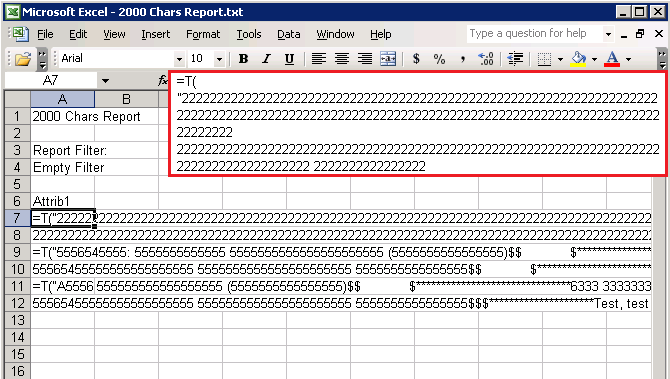
Long text is truncated to 255 characters when a report with an Attribute Form Category set to ID and Format Type set to Text is exported to Excel with Plain Text from Strategy Web 9.x.
 
In the picture below, notice the =T(" character string is exported with the truncated text:
 

ka04W00000148A5QAI_0EM4400000026oZ.png


STEPS TO REPRODUCE:
 

  1. In Strategy Web, run a report with at least a cell that retrieves more than 255 characters.
  2. Export this report to Excel.
  3. Select the option Excel with plain text and Check the option Export headers as text.
  4. Notice that the exported data is truncated to 255 characters.


CAUSE:
This issue is caused to due to a known issue in Strategy Web 9.x and it is not related with the presence of special characters in the report result.
 
WORKAROUND:
 
Perform one of the following options in order to export a report to Excel with no truncated strings:

  • Uncheck the Export headers as text option
  • Select the Excel with Formatting option
  • Export the report to Plain Text
  • Export the report to HTML


NOTE: Refer to the following Technical Note for further information on a similar issue in Strategy Developer:

  • KB11730: The string is truncated to 255 characters when a report with an attribute Form Category set to ID and Format Type set to Text is exported to Excel from Strategy Developer 9.x


Comment

0 comments

Details

Knowledge Article

Published:

June 15, 2017

Last Updated:

November 7, 2019