EducationSoftwareStrategy.com
StrategyCommunity

Knowledge Base

Product

Community

Knowledge Base

TopicsBrowse ArticlesDeveloper Zone

Product

Download SoftwareProduct DocumentationSecurity Hub

Education

Tutorial VideosSolution GalleryEducation courses

Community

GuidelinesGrandmastersEvents
x_social-icon_white.svglinkedin_social-icon_white.svg
Strategy logoCommunity

© Strategy Inc. All Rights Reserved.

LegalTerms of UsePrivacy Policy
  1. Home
  2. Topics

KB42620: How does the Additional Connection String Parameters feature for database connections work?


Community Admin

Placeholder •


A connection string stores the information required to connect to a database server. A connection string usually includes a DSN, as well as the user ID and password required to log in to the database server. This information varies depending on the particular database server. The 'Additional Connection String Parameters' feature of MicroStrategy allows the user to specify additional connection string parameters manually.

A connection string stores the information required to connect to a database server. A connection string usually includes a DSN, as well as the user ID and password required to log in to the database server. This information varies depending on the particular database server. The 'Additional Connection String Parameters' feature of Strategy allows the user to specify additional connection string parameters manually.
 
Additional Connection String Parameters:
 
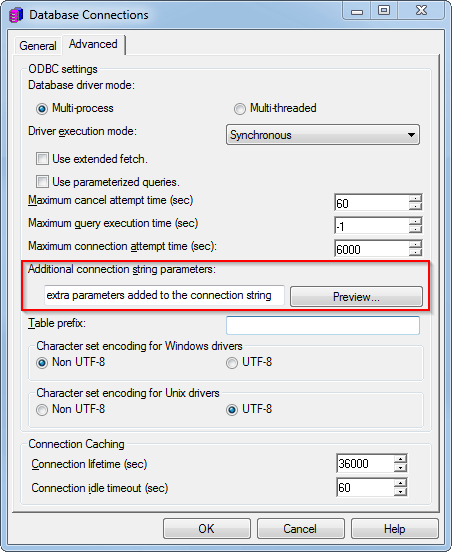
If users wish to add additional parameters to the database connection string manually, a field has been added when editing a database instance in the 'Advanced' tab of the Database Connections dialog as shown below:
 

ka0PW0000002xFJYAY_0EM440000002HMb.png

 
These extra parameters can be used to identify the application/project when monitoring activity from the database, give hints to the database load balancers, and other miscellaneous objects that are specific to a particular roll out and cannot be standardized as simple options in the editors.
 
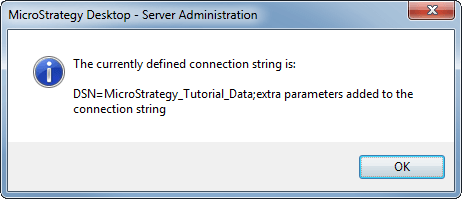
The preview button can be used to allow users to test how their final connection string will look like as shown below:
 

ka0PW0000002xFJYAY_0EM440000002HMY.png


Comment

0 comments

Details

Knowledge Article

Published:

April 16, 2017

Last Updated:

August 12, 2024