EducationSoftwareStrategy.com
StrategyCommunity

Knowledge Base

Product

Community

Knowledge Base

TopicsBrowse ArticlesDeveloper Zone

Product

Download SoftwareProduct DocumentationSecurity Hub

Education

Tutorial VideosSolution GalleryEducation courses

Community

GuidelinesGrandmastersEvents
x_social-icon_white.svglinkedin_social-icon_white.svg
Strategy logoCommunity

© Strategy Inc. All Rights Reserved.

LegalTerms of UsePrivacy Policy
  1. Home
  2. Topics

KB42621: "URL file uploads are currently disabled. Please contact your administrator" error message appears when attempting to import data from a URL and the radio button option is grayed out in MicroStrategy Web 9.3.0 HF1 or later


Community Admin

Placeholder •


"URL file uploads are currently disabled. Please contact your administrator" error message appears when attempting to import data from a URL and the radio button option is grayed out in MicroStrategy Web 9.3.0 HF1 or later

SYMPTOM:
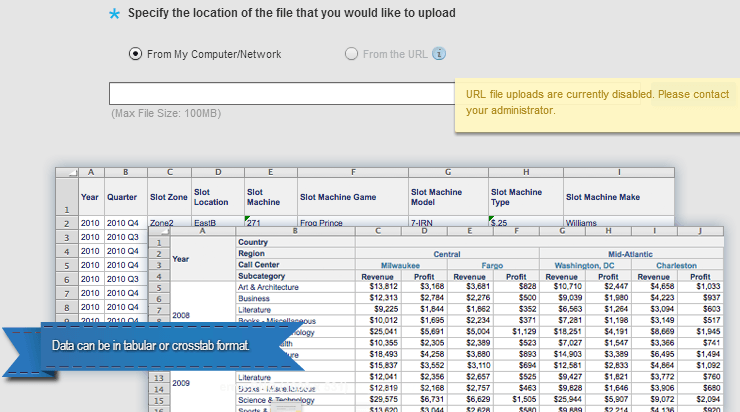
In Strategy Web 9.3.0 HF1 or later, when a user tries to import data from a URL, the error shown below is displayed when the user mouses over the information icon. The "From the URL" radio button option is also grayed out, as below:
 

ka04W000000OhNJQA0_0EM4400000026oX.png


"URL file uploads are currently disabled. Please contact your administrator"
  
CAUSE:
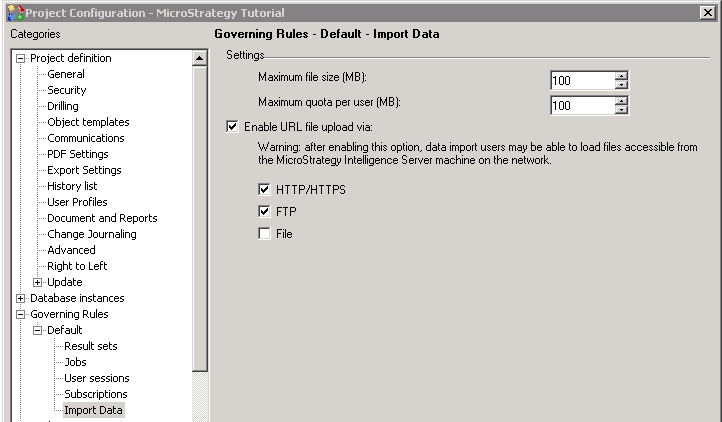
This is working as designed. The import data from URL option is disabled by default starting from Strategy Web 9.3.0 HF 1, due to the introduction of a new property setting that enables/disables this function.
 
ACTION:
To enable this option, right-click on the project in Strategy Desktop, open Project Configuration -> Governing Rules -> Import Data and check the "Enable URL file upload via: ..." option as below. This will enable the import from URL option in Strategy Web 9.3.0 HF 1 or later.
 

ka04W000000OhNJQA0_0EM4400000026oV.png


Comment

0 comments

Details

Knowledge Article

Published:

May 24, 2017

Last Updated:

May 24, 2017