EducationSoftwareStrategy.com
StrategyCommunity

Knowledge Base

Product

Community

Knowledge Base

TopicsBrowse ArticlesDeveloper Zone

Product

Download SoftwareProduct DocumentationSecurity Hub

Education

Tutorial VideosSolution GalleryEducation courses

Community

GuidelinesGrandmastersEvents
x_social-icon_white.svglinkedin_social-icon_white.svg
Strategy logoCommunity

© Strategy Inc. All Rights Reserved.

LegalTerms of UsePrivacy Policy
  1. Home
  2. Topics

KB42625: Textboxes appear to be shifting position when placed on a grid and viewed in MicroStrategy Web, Developer, and Export to PDF in 9.3.x


Stefan Zepeda

Salesforce Solutions Architect • Strategy


When placed over a grid in a document, textboxes appear to be shifting position depending on how the user views the document. The position appears differently in MicroStrategy Web, Developer, and Export to PDF in 9.3.x.

SYMPTOM:
 
When placed over a grid in a document, textboxes appear to be shifting position depending on how the user views the document. The position appears differently in Strategy Web, Developer, and Export to PDF in 9.3.x.
 
STEPS TO REPRODUCE:

  • Create a new dashboard with any dataset.
  • Insert a grid based on the dataset.
  • Create a new textbox, and move it over the grid.
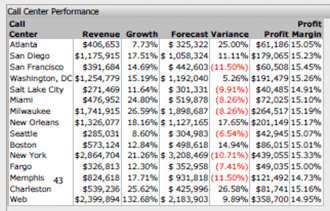
  • Note the textbox's position in Strategy Web, as below. In this screenshot, the textbox is "43" and is located in the last row:
ka02R000000kXGFQA2_0EM4400000026ny.png
  • Export to PDF and notice that the textbox position seems to have shifted position up two rows on the grid, as below:
ka02R000000kXGFQA2_0EM4400000026ns.png
  • View the document in Strategy Developer. Notice that the textbox position is the same as that in PDF and different from Strategy Web, as below:
ka02R000000kXGFQA2_0EM4400000026nu.png

This may take several tries to reproduce, as it's not always consistent.
 
CAUSE:
 
This is a known issue in Strategy Web 9.3.x.
 
ACTION:
 
Strategy will continue to investigate and post updates as soon as they are available.


Comment

0 comments

Details

Knowledge Article

Published:

June 20, 2017

Last Updated:

June 20, 2017