To achieve this functionality in Strategy, the following VLDB setting "Advanced Table Pattern" must be exposed so that users can make the changes to the pattern of the generated SQL as desired.
<Setting>
      <Name>MDX Non Empty Optimization</Name>
      <MaxValues>4</MaxValues>
      <GroupID>10</GroupID>
      <Type>4</Type>
      <DataSourceType>4</DataSourceType>
      <ReportType>3</ReportType>
       <DisplayName>MDX Non Empty Optimization</DisplayName>
      <DisplayLevel>2</DisplayLevel>
      <ShowSQLPreview>0</ShowSQLPreview>
      <SQLPreview1/>
      <ValueOption1>22375</ValueOption1>
      <SQLPreview2/>
      <ValueOption2>22376</ValueOption2>
      <SQLPreview3/>
      <ValueOption3>22377</ValueOption3>
      <SQLPreview4/>
      <ValueOption4>22378</ValueOption4>
    </Setting>
   <HTML>
      <body bgcolor="#FFFFFF">
         <font color="#0000FF" face = "Times Roman" size="3">
            <SettingName>Report PreStatement 1</SettingName>
         </font>
<Setting>
      <Name>Advanced Table Pattern</Name>
      <MaxValues>1</MaxValues>
      <GroupID>5</GroupID>
      <Type>0</Type>
      <DataSourceType>25</DataSourceType>
      <DisplayName>Advanced Table Pattern</DisplayName>
      <DisplayLevel>2</DisplayLevel>
      <ShowSQLPreview>0</ShowSQLPreview>
      <SQLPreview1/>
   </Setting>
  <Setting>
      <Name>MDX Non Empty Optimization</Name>
      <MaxValues>4</MaxValues>
      <GroupID>10</GroupID>
      <Type>4</Type>
      <DataSourceType>4</DataSourceType>
      <ReportType>3</ReportType>
       <DisplayName>MDX Non Empty Optimization</DisplayName>
      <DisplayLevel>2</DisplayLevel>
      <ShowSQLPreview>0</ShowSQLPreview>
      <SQLPreview1/>
      <ValueOption1>22375</ValueOption1>
      <SQLPreview2/>
      <ValueOption2>22376</ValueOption2>
      <SQLPreview3/>
      <ValueOption3>22377</ValueOption3>
      <SQLPreview4/>
      <ValueOption4>22378</ValueOption4>
    </Setting>
   <Setting>
      <Name>Advanced Table Pattern</Name>
      <MaxValues>1</MaxValues>
      <GroupID>5</GroupID>
      <Type>0</Type>
      <DataSourceType>25</DataSourceType>
      <DisplayName>Advanced Table Pattern</DisplayName>
      <DisplayLevel>2</DisplayLevel>
      <ShowSQLPreview>0</ShowSQLPreview>
      <SQLPreview1/>
   </Setting>
   <HTML>
      <body bgcolor="#FFFFFF">
         <font color="#0000FF" face = "Times Roman" size="3">
            <SettingName>Report PreStatement 1</SettingName>
         </font>
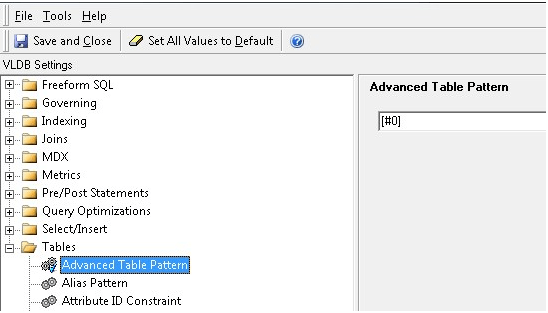
NOTE:
This setting interacts with the "Space in Tablename Pattern" VLDB setting (also hidden) and may not need to be applied in all cases as this syntax is automatically handled for some databases. Also the previous setting "Table Name Pattern" applies to the table names used in Temporary tables and may be modified in the same manner as above.
Metadata Modification WARNING
Manually editing values in the Strategy Metadata incorrectly may cause serious, project-wide problems that may make your project unusable. Since these are user-initiated changes, they are not covered by any Strategy warranty. Users are strongly encouraged to backup Metadata prior to any alteration.
