Strategy Web users in 9.3 versions and higher may find that not all of their available schedules are available when creating subscriptions. A new feature in Strategy 9.3.0 called "Schedules for subscriptions" may be the reason for this. This feature allows any user who runs a report and/or document in Web to choose which schedules are available for that report's subscriptions. Any Web user can edit this option at any time after running a report or document, which is why existing subscriptions can suddenly lose the schedule that it normally runs on.
To access this feature for reports in Web:
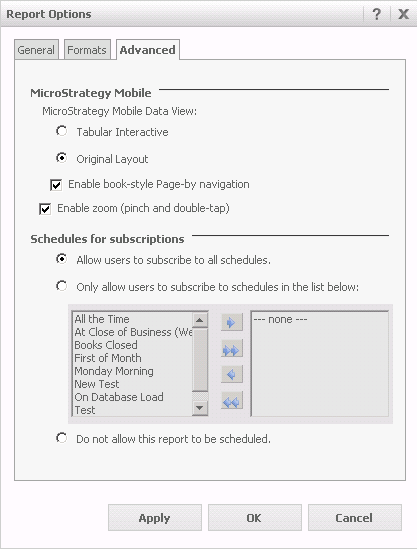
1. Run any report in Design mode in Web 9.3.+.
2. Go to the Tools drop down and select Report Options.
3. Navigate to the Advanced tab. Here there is a section called "Schedules for subscriptions".
4. Users can select the option to "Only allow users to subscribe to schedules in the list below" and they can select the schedules to be made available.
To access this feature for documents/dashboards:
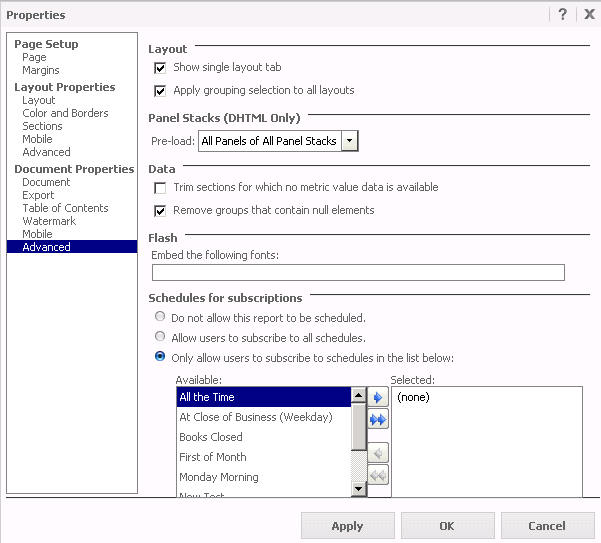
1. Run any document/dashboard in Design mode in Web 9.3.0.
2. Go to the Tools drop down and select Document Options.
3. Navigate to the Document Properties > Advanced section. Here there is a section called "Schedules for subscriptions".
4. Users can select the option to "Only allow users to subscribe to schedules in the list below" and they can select the schedules to be made available.
If a user limits the schedules that are available for existing subscriptions, a warning will be thrown in Web when trying to edit the subscription. The user will be forced to choose one of the schedules that are available.

