SYMPTOM:
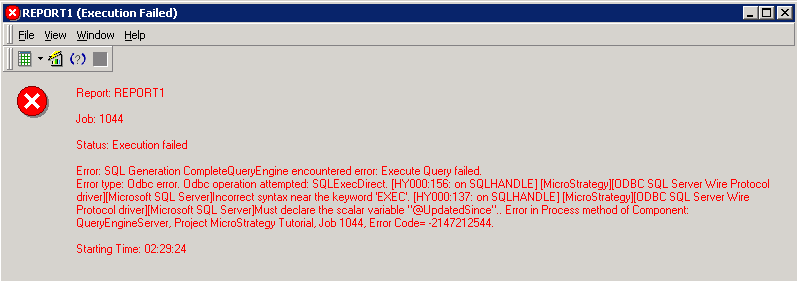
When running a freeform report executing a stored procedure with value prompts against SQL Server database, users get error below. The error occurs in Strategy 10.6.
Error: SQL Generation Complete
QueryEngine encountered error: Execute Query failed.
Error type: Odbc error. Odbc operation attempted: SQLExecDirect. [HY000:156: on SQLHANDLE] [Strategy][ODBC SQL Server Wire Protocol driver][Microsoft SQL Server]Incorrect syntax near the keyword 'EXEC'. [HY000:137: on SQLHANDLE] [Strategy][ODBC SQL Server Wire Protocol driver][Microsoft SQL Server]Must declare the scalar variable "@UpdatedSince"..
Error in Process method of Component: QueryEngineServer, Project Strategy Tutorial, Job 998, Error Code= -2147212544.
CREATE TABLE CONTACT ( ID INT, CONTACTID varchar(50), UPDATEDSINCE DATE);

CREATE PROCEDURE spContact
    @Id varchar(50),
    @UpdatedSince date
AS
    SELECT ID,CONTACTID,UPDATEDSINCE
    FROM CONTACT
WHERE CONTACTID=@Id AND UPDATEDSINCE=@UpdatedSince;

INSERT INTO CONTACT VALUES (1, 'abcdefg', '2016/04/19');DECLARE @Id AS VARCHAR(50) = 'ContactID' DECLARE @UpdatedSince AS Date = Date EXEC spContact @Id = @Id,@UpdatedSince = @UpdatedSince;
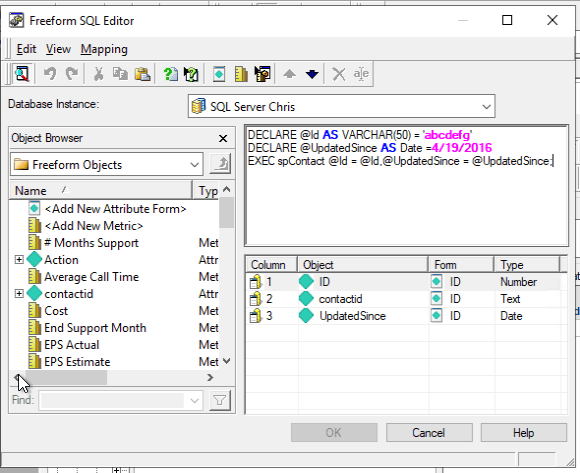
3. Run the report, enter prompt answers:
ContactID: abcdefg
DatePP: 4/19/2016
Get error as shown below.
CAUSE:
This is a known issue in Strategy 10.6.
ACTION:
The issue has been addressed in Strategy 10.7 and 10.8. Besides, the issue does not occur in Strategy 10.4.
KB426501
