SYMPTOM:
If a user runs an Intelligent Cube report while the Cube is being re-published, the Cube report will show the data from before the Intelligent Cube began re-publishing. The user would like to make Cube reports unavailable while the Cube is being re-published using Command Manager.
STEPS TO REPRODUCE:
1. Create a new event called "Test"
2. Create a new event-based schedule based on the "Test" event
3. In Desktop, select the Administration menu > Scheduling > Schedule Administrative Task
4. In the Schedule Administrative Tasks window, select the desired project and select the action to Deactivate Intelligent Cube.
5. Select the schedule you had created in step 2 and in the Intelligent Cubes field, select the desired Intelligent Cube as seen below:
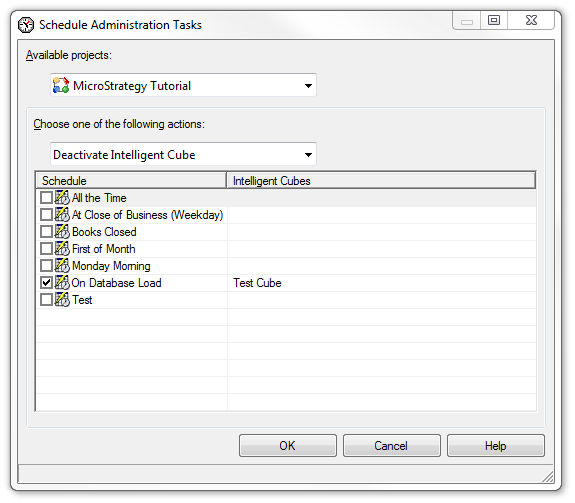
6. This will set the Deactivate Intelligent Cube action to be triggered by the event created in Step 2
7. In command manager run the following commands:
TRIGGER EVENT "<event_name>";
PUBLISH INTELLIGENT CUBE "<cube_name>" IN FOLDER "<location_path>" FOR PROJECT "<project_name>";
8. This command will deactivate the Intelligent Cube cache so reports from this Intelligent Cube will not be able to run while it is being re-published. After the Intelligent Cube has finished republishing, the Cube reports will contain the updated data.
