Summary:
This Article describes a data inconsistency within the Enterprise Manager project when placing the 'Day' attribute inside of the calendar selector for a document. Any selections made will cause some or all data to be filtered out as a result in Strategy versions 10.4 -10.7. This is a known issue with the 'Day' attribute that is not seen in Strategy 10.8 and later. For Strategy versions 10.4 - 10.7, there is a workaround of manipulating the attribute as defined below.
Symptom:
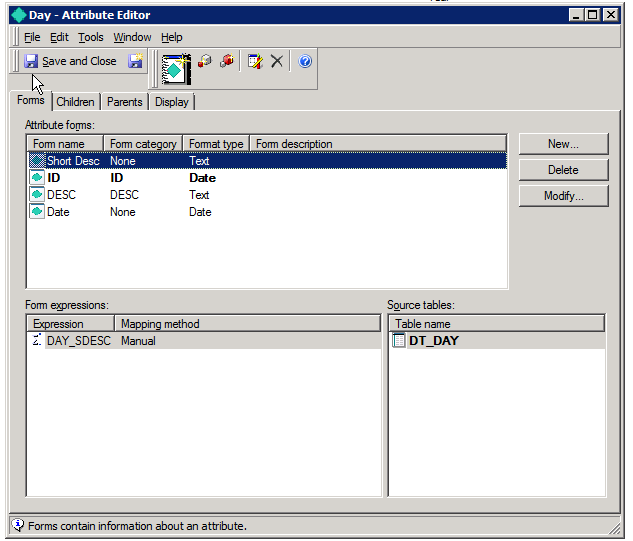
When using the 'Day' attribute inside the calendar selector, the Short Desc attribute form is being passed in the SQL instead of the ID form needed to execute the where clause statement in order to return the correct data.
Steps to Reproduce:
1. Create a document with the 'Day' attribute by itself in the grid and as the element for the calendar selector. Execute the document before making any changes to the selector.

2. Try and make a manipulation to the selector that will still return data in a working scenario. Notice the message, "No data returned for this view. This might be because the applied filter excludes all data." populates.

3. This is due to the order of attribute forms set inside the Day Attribute causing the 'Short Desc' attribute form to be used for the SQL when executing the document.
Cause:
This is an identified defect in Strategy 10.4 through 10.7. The issue is not seen in Strategy 10.8 or later.
Action/Workaround:
Upgrade to Strategy 10.8 or higher. Otherwise, follow the instructions below:
1. Edit the 'Day' attribute inside of the Enterprise Manager project. Remove the 'Short Desc' attribute form, save/close the attribute editor, update schema of the project, and then re-edit the 'Day' attribute adding the 'Short Desc' attribute form back with its previous definition. After making the change, save/close the attribute editor and update the schema of the project. When done correctly, the attribute will look as below.
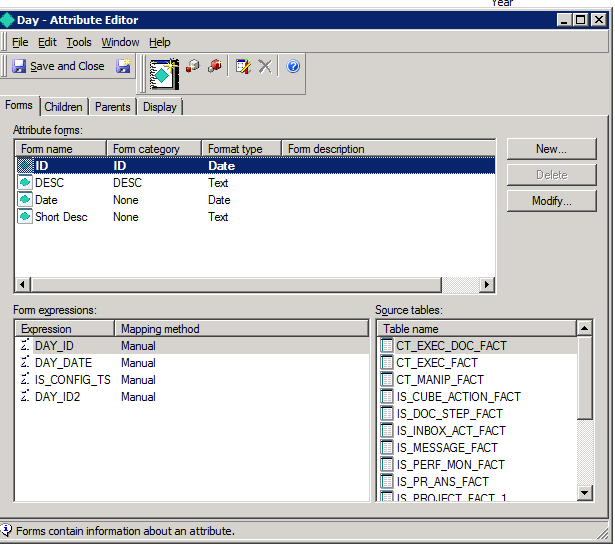
2. After performing the 'Day' attribute edit, please re-run the same Document and notice that the 'Day' attribute can now be used in the calendar selector successfully.

KB426562
