EducationSoftwareStrategy.com
StrategyCommunity

Knowledge Base

Product

Community

Knowledge Base

TopicsBrowse ArticlesDeveloper Zone

Product

Download SoftwareProduct DocumentationSecurity Hub

Education

Tutorial VideosSolution GalleryEducation courses

Community

GuidelinesGrandmastersEvents
x_social-icon_white.svglinkedin_social-icon_white.svg
Strategy logoCommunity

© Strategy Inc. All Rights Reserved.

LegalTerms of UsePrivacy Policy
  1. Home
  2. Topics

KB426570: How to remove or customize '. MicroStrategy' in MicroStratgy web page title for MicroStrategy Web 10.x


Sheng (Randy) Wu

Senior Cloud Support Engineer III • MicroStrategy


This article is used to customize MicroStrategy Web page title message for 10.x

SYMPTOM:
By default, all MicroStratgy web page include word '. Strategy' in the Title. Users may wan to include their company/corporation name in the title instead of 'Strategy'.
ACTION:
In order to achieve below, make sure to have SDK access and WCE deployed.

  1. Create a new plugin in the Web Customization Editor for this customization
  2. Navigate to Application Settings > Property Files > WEB-INF > classes > resources, double click to edit file 'MessageBundle_en_US.properties'
  3. Search and find properties message 'mstrWeb.8965', and change its value from '. Strategy' to the expected one, for e.g. 'Test'
  4. Save the file, restart the web server to make change to take effect


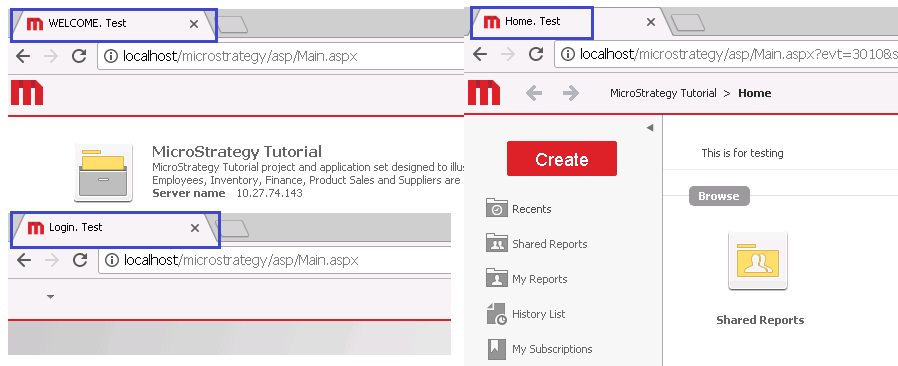
Customization result as below:

ka02R000000kbPEQAY_0EM440000002TOS.png

Note: For Strategy 9.4.1, please refer to KB34451: How to Change the Browser Title to Display Custom Text in MicroStrategy Java Web SDK 9.4.1


Comment

0 comments

Details

Knowledge Article

Published:

June 30, 2017

Last Updated:

June 30, 2017