EducationSoftwareStrategy.com
StrategyCommunity

Knowledge Base

Product

Community

Knowledge Base

TopicsBrowse ArticlesDeveloper Zone

Product

Download SoftwareProduct DocumentationSecurity Hub

Education

Tutorial VideosSolution GalleryEducation courses

Community

GuidelinesGrandmastersEvents
x_social-icon_white.svglinkedin_social-icon_white.svg
Strategy logoCommunity

© Strategy Inc. All Rights Reserved.

LegalTerms of UsePrivacy Policy
  1. Home
  2. Topics

KB426575:How to create a metric to calculate Month-to-Date(MTD) Data without using transformation tables in warehouse.


Lisha Ma

Senior Cloud Support Engineer III • MicroStrategy


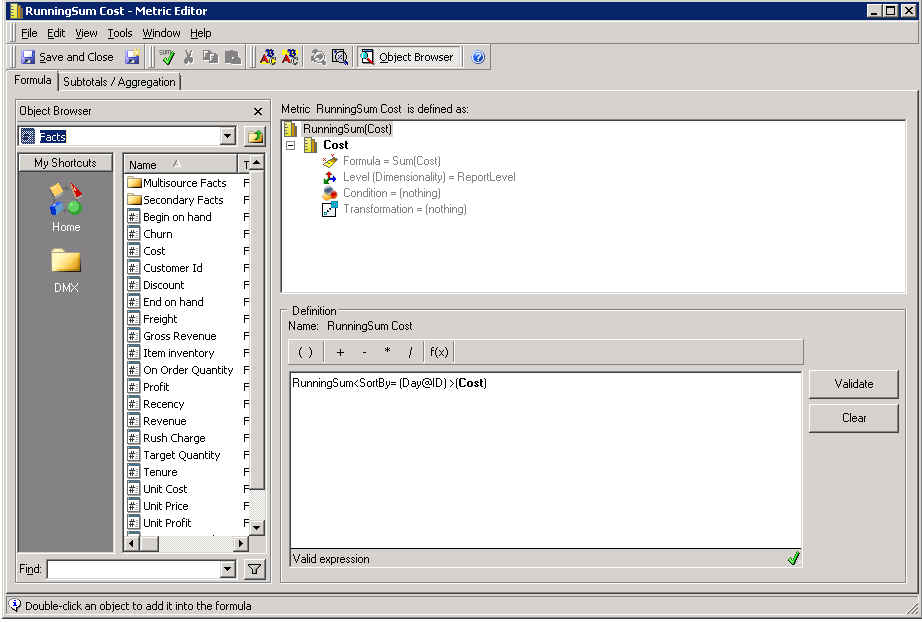
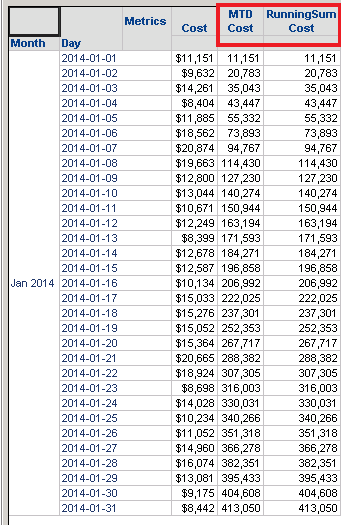
MicroStrategy has two kinds of transformations, that are expression-based transformations and Table-based transformations. As to the Month-to-Date(MTD) calculation, creating a table-based transformation, and a transformation metric is a general way. But here we use a function Runningsum to achieve this instead.

Strategy has two kinds of transformations, expression-based transformations and Table-based transformations. As to the Month-to-Date(MTD) calculation, creating a table-based transformation, and a transformation metric is a general way. This article explains how to use a function Runningsum to achieve this instead.
Runningsum function returns the running sum of the values in a list, adding the current value to the preceding values. It can be used to maintain running totals of values in specific categories as well as an entire set. The calculation can restart based on attributes identified in the parameter settings. This is an OLAP function.
ka02R000000kbBiQAI_0EM440000002TP1.png
ka02R000000kbBiQAI_0EM440000002TP6.png

For more information about function Runningsum, please check the product manual < Strategy Functions Reference>


Comment

0 comments

Details

Knowledge Article

Published:

January 18, 2018

Last Updated:

January 18, 2018