Summary:
This Article describes a new issue observed preventing a table from being imported into Warehouse Catalog from Google BigQuery that does not contain any underscores. This is an issue first identified in Strategy 10.7.
Symptom:
When trying to import a table that contains an underscore in the table name, Warehouse Catalog will return an error, "Error adding Tables(s) to the schema. Database error <>: No Error." Tables that contains underscores will import correctly.
The below screenshot demonstrates the error message that displays when trying to import the 'Update' table.
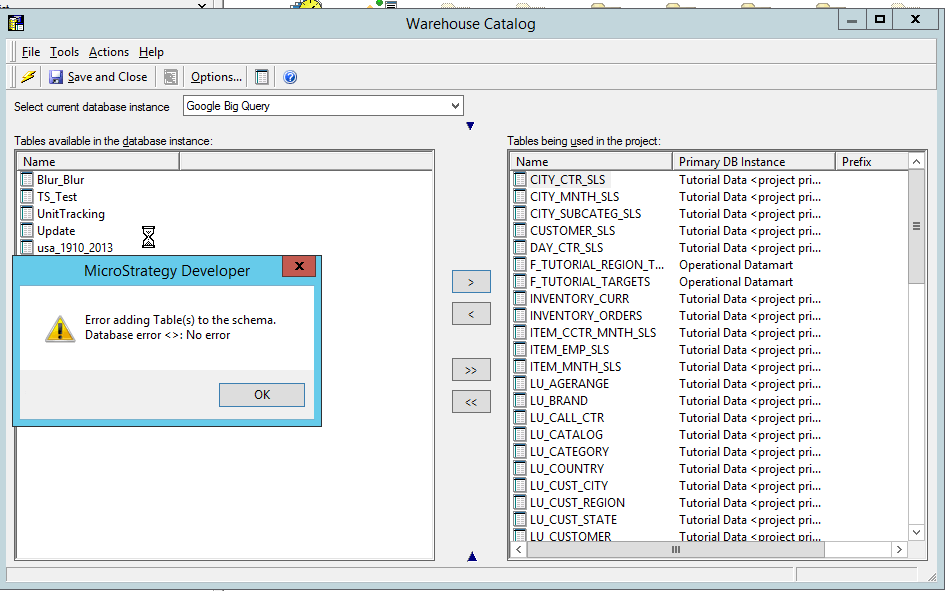
Steps to Reproduce:
1. Create a table on the Google Big Query side with a new that does not contain any spaces or underscores.
2. Open Warehouse Catalog, and utilize the Google Big Query Database Instance.
3. Try to import the newly created table into a project and you will witness the error above.
Cause:
This is an identified defect starting in Strategy 10.7.
Action:
Currently, this issue is still being reviewed by our Technology Team. Please contact Strategy Technical Support for an update regarding this issue.
KB426584
