EducationSoftwareStrategy.com
StrategyCommunity

Knowledge Base

Product

Community

Knowledge Base

TopicsBrowse ArticlesDeveloper Zone

Product

Download SoftwareProduct DocumentationSecurity Hub

Education

Tutorial VideosSolution GalleryEducation courses

Community

GuidelinesGrandmastersEvents
x_social-icon_white.svglinkedin_social-icon_white.svg
Strategy logoCommunity

© Strategy Inc. All Rights Reserved.

LegalTerms of UsePrivacy Policy
  1. Home
  2. Topics

KB42660: Rows with metric value in the order of 0.00000000001 are eliminated by Analytical Engine in a report with view filter "metric different from 0" in MicroStrategy


Community Admin

• Strategy


This article notes a limitations with view filter logic for very small numbers

SYMPTOM:
Rows with metric value in the order of 0.000000001 are eliminated by Analytical Engine in a report with view filter "metric different from 0" in Strategy.
The following steps demonstrate how to reproduce this issue in tutorial project:
Create Table Table1 (Column1 double);
Insert into Table1 Values (0.00000000001);
 

  1. In tutorial warehouse, create an table and insert values with script below:
  2. Import Table1 into project. Create a fact "Fact1" mapping to Column1. Create metric M1 with formula "Sum(Fact1)". Set the format of M1 as fixed decimal and "Decimal places" as "11".
  3. Create and execute a report with M1 in columns as shown below:
ka04W000000OhYWQA0_0EM440000002CuO.png


  • Add view filter "M1 Different from 0". The row with value "0.00000000001" will be eliminated by Analytical Engine and no data will display in the grid as shown below:
ka04W000000OhYWQA0_0EM440000002CuK.png

 
CAUSE:
The cause for this issue is that the precision for columns with double data type is lower than 0.00000000001 in Strategy Analytical Engine.
 
ACTION:
Use big decimal instead of double as the data type for Column1 with steps below:
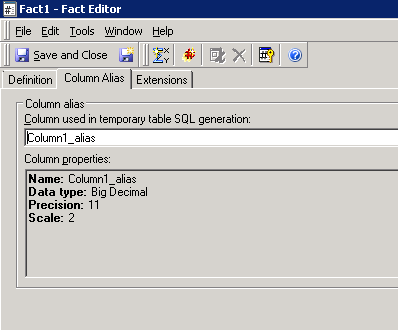
  1. Modify Fact1 and set a new column alias with big decimal data type. Set precision as 11 and scale as 2 as shown below:
ka04W000000OhYWQA0_0EM440000002CuV.png


  • Update schema and use "#0#" instead of "0" in the view filter condition as shown below:
ka04W000000OhYWQA0_0EM440000002CuL.png


  • Then, the row will not be eliminated as shown below:
ka04W000000OhYWQA0_0EM440000002Cub.png

 
NOTE:  Fore more details about big decimal data type, please refer to the following article:
 KB11195: Precision is lost when Analytical Engine calculations are performed on Big Decimal datatypes in MicroStrategy


Comment

0 comments

Details

Knowledge Article

Published:

May 15, 2017

Last Updated:

May 15, 2017