EducationSoftwareStrategy.com
StrategyCommunity

Knowledge Base

Product

Community

Knowledge Base

TopicsBrowse ArticlesDeveloper Zone

Product

Download SoftwareProduct DocumentationSecurity Hub

Education

Tutorial VideosSolution GalleryEducation courses

Community

GuidelinesGrandmastersEvents
x_social-icon_white.svglinkedin_social-icon_white.svg
Strategy logoCommunity

© Strategy Inc. All Rights Reserved.

LegalTerms of UsePrivacy Policy
  1. Home
  2. Topics

KB42663: Dynamic Subscription report is not filtered in a personalized report execution in MicroStrategy Narrowcast 9.x - 10.x


Community Admin

• Strategy


Dynamic Subscription report is not filtered in a personalized report execution (PRE) in MicroStrategy Narrowcast 9.x - 10.x, and all recipients get the entire report content without being filtered.

SYMPTOM:
Dynamic Subscription report is not filtered in a personalized report execution (PRE) in Strategy Narrowcast 9.x - 10.x, and all recipients get the entire report content without being filtered.
 
STEPS TO REPRODUCE:
Follow the steps below to reproduce the issue:

  1. In Strategy Developer, create a report "R_Prompt" in order to generate the xml containing the preference object for personalized report execution. Report template refer to step 7 in KB12127 - How to create a dynamic report execution service in Strategy Narrowcast Server 9.0.x - 9.2.x.
  2. Create the xml containing the preference object for personalized report execution. Refer to KB14702- How to create the xml containing the preference object for personalized report execution in Strategy Narrowcast Server 9.0.x - 9.2.x.
  3. Configure PRE preparation steps for Strategy Developer. Refer to Step 1 to Step 6 in KB12127.
  4. In Strategy Developer, create a new report "Dynamic Report Execution (Content Report)" with same template as report "R_Prompt" in step 1 of this technical note.
  5. Configure PRE steps for Strategy Narrowcast Server. Refer to step 8 to step 11 in KB12127.
    NOTE: In step 9 of KB12127, the Information Object is pointing to the report "Dynamic Report Execution (Content Report)", rather than the report "R_Prompt" in step 1 of this technical note.
  6. Execute the service. Recipients will receive the same report content without being filtered.

 
CAUSE:
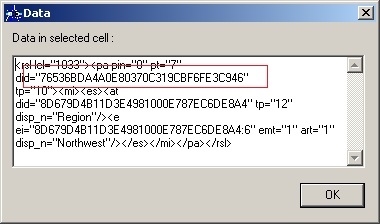
The reason for the issue is that the xml generated in step 2 does not contain the correct object ID. The first object ID in the xml should be the prompt object ID, as shown below:
ka04W000000Ohf2QAC_0EM4400000029cz.jpeg

 
This preference object xml definition is created according to the first report "R_Prompt", while the Information Object is pointing to a different report "Dynamic Report Execution (Content Report)". And the prompt object ID in the preference object xml definition is different from the embedded prompt ID of the Information Object report. As a result, all recipients may receive the entire report content without being filtered since the preference object is not taking in place.
 
ACTION:
Follow the steps below to make the preference object point to the correct prompt object:

  1. In Strategy Developer, create a stand-alone prompt object "New Prompt" based on the same definition with the embedded prompt of report "Dynamic Report Execution (Content Report)" to which the Information Object points.
  2. Edit the report "Dynamic Report Execution (Content Report)". Remove the embedded prompt and add the prompt object "New Prompt" as the report filter.
  3. Edit the preference object xml definition in subscription table. Change the prompt ID into the ID of "New Prompt".
  4. Update the schema.
  5. Open Narrowcast Administrator and execute the service again. The report is filtered correctly.

Comment

0 comments

Details

Knowledge Article

Published:

May 1, 2017

Last Updated:

May 1, 2017