EducationSoftwareStrategy.com
StrategyCommunity

Knowledge Base

Product

Community

Knowledge Base

TopicsBrowse ArticlesDeveloper Zone

Product

Download SoftwareProduct DocumentationSecurity Hub

Education

Tutorial VideosSolution GalleryEducation courses

Community

GuidelinesGrandmastersEvents
x_social-icon_white.svglinkedin_social-icon_white.svg
Strategy logoCommunity

© Strategy Inc. All Rights Reserved.

LegalTerms of UsePrivacy Policy
  1. Home
  2. Topics

KB426657: The error: "The conversion of a varchar data type to a datetime data type resulted in an out-of-range value." appears during different circumstances when using a SQL Server database


Stefan Zepeda

Salesforce Solutions Architect • Strategy


This KB article discusses an issue that may arise when there is a discrepancy between various language settings in the environment and offers a solution.

SYMPTOM:
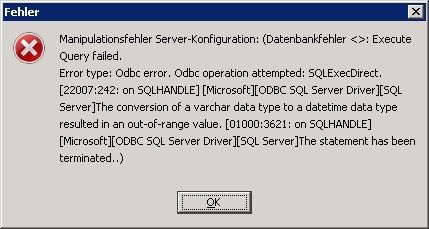
The error: "The conversion of a varchar data type to a datetime data type resulted in an out-of-range value." appears during different circumstances such as running reports, configuring the Strategy Intelligence Server or populating the Narrowcast Server Object Repository when using a SQL Server database. The performed operation will stop with this error and the user cannot proceed.
ka044000000kKwuAAE_0EM440000002UpQ.jpeg

 
In the DSSErrors log the following may be found:


Execute Query failed.
Error type: Odbc error. Odbc operation attempted: SQLExecDirect. The conversion of a varchar data type to a datetime data type resulted in an out-of-range value.
 
CAUSE:
A possible cause for this is a discrepancy between various language settings in the environment, which are often decided by how SQL Server has been configured.
 
ACTION:
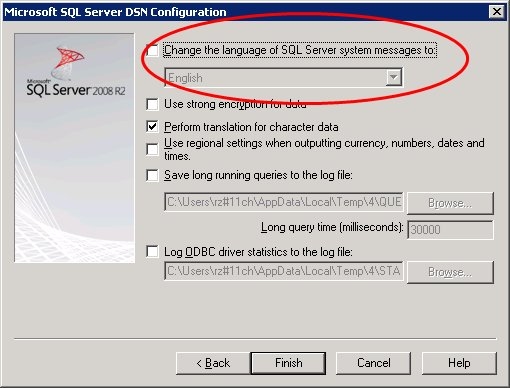
The easiest solution to this problem is to simply change the language of SQL Server system messages on the ODBC DSN used by the offending application. You will find this by stepping through the configuration of the specific DSN in Microsoft ODBC Manager:

ka044000000kKwuAAE_0EM440000002UpP.jpeg

 
What it should be changed to depends on the specific environment, but a thumb-rule is to change it to either English or the local language (i.e. German in Germany) depending on what the setting was to begin with.
Article Reference Number: KB426657
KB426657


Comment

0 comments

Details

Knowledge Article

Published:

July 17, 2017

Last Updated:

November 13, 2018