SYMPTOM:
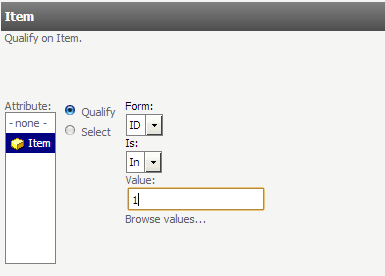
Attribute qualification prompts displayed in list style provide the options to "Qualify" or "Select" elements of an attribute. If "Qualify" is chosen along with the "In" operator with the attribute's ID form, commas or semicolons are used to separate elements. However, in Strategy Web, the comma or semicolon automatically disappears about a second after it is typed. This prevents the user from being able to enter more than one element to qualify on.
STEPS TO REPRODUCE:
Follow these steps in Strategy Tutorial to reproduce:
CAUSE:
This is a known issue with the attribute qualification prompt interface, specific to the list style prompt in Strategy Web.
ACTION:
Contact Strategy Technical Support for an update on this issue.
WORKAROUND:
The issue seems to occur only when the separator is typed in and is not followed by any other values. However if the separator is typed in and immediately followed by the next element, the separator will not disappear.
Another options is to use the "Browse values" option in the prompt.
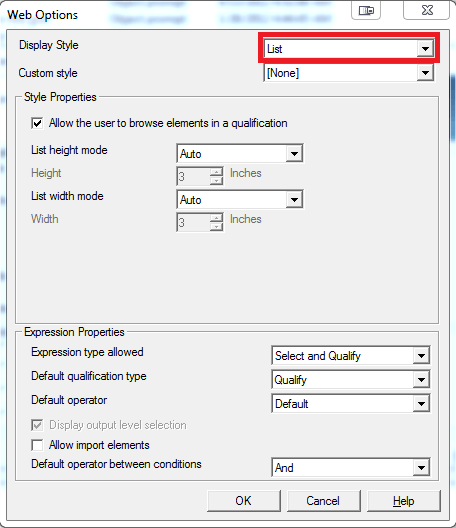
Also, because this issue is specific to the List style, changing the prompt display style to "Shopping Cart" in the Web options of the prompt wizard will prevent the issue.
