EducationSoftwareStrategy.com
StrategyCommunity

Knowledge Base

Product

Community

Knowledge Base

TopicsBrowse ArticlesDeveloper Zone

Product

Download SoftwareProduct DocumentationSecurity Hub

Education

Tutorial VideosSolution GalleryEducation courses

Community

GuidelinesGrandmastersEvents
x_social-icon_white.svglinkedin_social-icon_white.svg
Strategy logoCommunity

© Strategy Inc. All Rights Reserved.

LegalTerms of UsePrivacy Policy
  1. Home
  2. Topics

KB42698: Attributes added to the "Blank Report" template are not available when creating new reports in MicroStrategy Developer 9.x


Stefan Zepeda

Salesforce Solutions Architect • Strategy


Attributes added to the "Blank Report" template are not available when creating new reports in MicroStrategy Developer 9.x

  
SYMPTOM:
 
When adding an attribute to the Blank Report template layout or page-by section in Strategy Developer 9.x, then saving the template and creating a new report using this template, the report template doesn't include the attribute.  
 
 
STEPS TO REPRODUCE: 

  • Edit the Blank Report template from Strategy Tutorial project in Strategy Developer
  • Add an attribute to rows and another to page-by section; then save and close.
  • Create a new report using the Blank Report template newly modified.   
  • As shown, the newly added attribute does not appear:
     
ka02R000000kZQQQA2_0EM440000002Cud.png
  • Close the report editor without saving it.
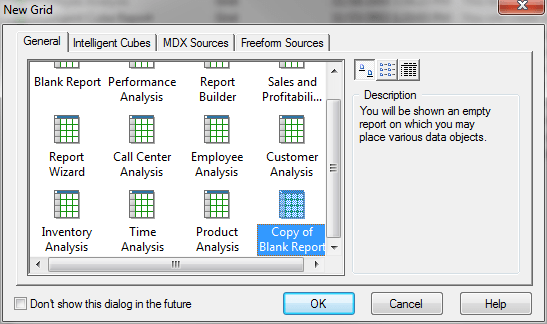
  • Make a copy of the Blank Report template. 
  • Create a new report using the referred report template copy, in this case Copy of Blank Report:
ka02R000000kZQQQA2_0EM440000002CuP.png
  • As expected, the attribute newly added appears normally:
ka02R000000kZQQQA2_0EM440000002Cuc.png

CAUSE:
 
This is a known issue in Strategy Developer 9.x.
 
 
ACTION:
 
Contact the Strategy the Strategy Technical Support for an update on this issue.


Comment

0 comments

Details

Knowledge Article

Published:

June 14, 2017

Last Updated:

June 14, 2017