EducationSoftwareStrategy.com
StrategyCommunity

Knowledge Base

Product

Community

Knowledge Base

TopicsBrowse ArticlesDeveloper Zone

Product

Download SoftwareProduct DocumentationSecurity Hub

Education

Tutorial VideosSolution GalleryEducation courses

Community

GuidelinesGrandmastersEvents
x_social-icon_white.svglinkedin_social-icon_white.svg
Strategy logoCommunity

© Strategy Inc. All Rights Reserved.

LegalTerms of UsePrivacy Policy
  1. Home
  2. Topics

KB42710: How to display a report with No Header, No footer, and No toolbar in MicroStrategy Web 9.3 and later


Community Admin

• Strategy


How to display a report with No Header, No footer, and No toolbar in MicroStrategy Web 9.3 and later

SYMPTOM
 
Prior to Strategy Web 9.3.0, users would have to add the following parameter to a URL API link in order to display a report with no header, no footer, and no toolbar as highlighted in tech note KB30972.


pg=reportNoHeaderNoFooterNoPathNoToolbar

 
However, the same functionality cannot be achieved using this method in Strategy Web 9.3.0.
 
STEPS TO REPRODUCE

  • Insert the parameter shown above to the report URL so that it looks like the URL shown below:
     
ka04W000000OgedQAC_0EM4400000026na.png
  •  
    And the report will display, as shown below:
ka04W000000OgedQAC_0EM4400000026nj.png
  • Notice: The header still appears in the report.

 
CAUSE
 This is a known issue in Strategy Web 9.3.0.
 
ACTION
Contact Strategy Technical Support for an update on this issue.
 
WORKAROUND

  • Through Strategy Web 9.3.0, navigate to the desired report.
  • Right click on the report > Show link.
  • The Show link menu provides an iframe option with a link already formulated to match those same settings like shown below.
ka04W000000OgedQAC_0EM4400000026np.jpeg
  • The link is included between the source tags of the iframe and contains the URL API parameter:
     

    Sample Code/Error
    &hiddensections=header,path,dockTop,dockLeft,footer 

     
  • Use this parameter in the URL instead of the pg parameter.
     
    e.g.


    http://localhost/MicroStrategy/asp/Main.aspx?Server=localhost&Project=Strategy+Tutorial&port=0&evt=4001&src=Main.aspx.4001&visMode=0&reportID=9617FA4D42B6A5CC81C8A7AE55E36439&reportViewMode=1&hiddensections=header,path,dockTop,dockLeft,footer


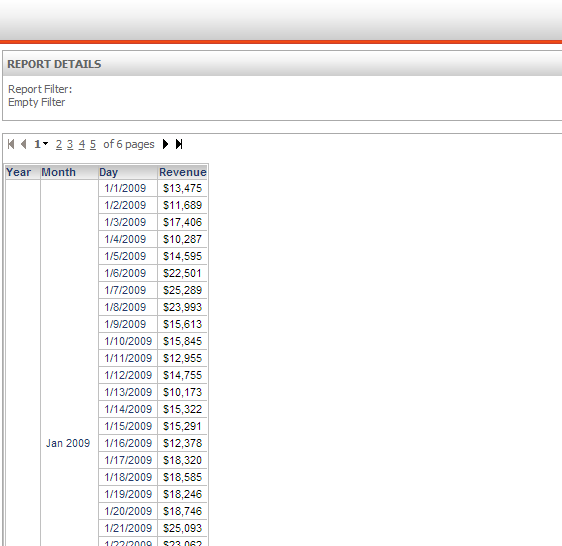
    And the report will display correctly, as shown below: 
ka04W000000OgedQAC_0EM4400000026nn.png


Comment

0 comments

Details

Knowledge Article

Published:

June 13, 2017

Last Updated:

June 13, 2017