EducationSoftwareStrategy.com
StrategyCommunity

Knowledge Base

Product

Community

Knowledge Base

TopicsBrowse ArticlesDeveloper Zone

Product

Download SoftwareProduct DocumentationSecurity Hub

Education

Tutorial VideosSolution GalleryEducation courses

Community

GuidelinesGrandmastersEvents
x_social-icon_white.svglinkedin_social-icon_white.svg
Strategy logoCommunity

© Strategy Inc. All Rights Reserved.

LegalTerms of UsePrivacy Policy
  1. Home
  2. Topics

KB42726: Columns are missing on one of the grids when a dashboard with 2 panel stacks, each with a grid, is exported to Excel in MicroStrategy Web


Community Admin

• Strategy


Columns are missing on one of the grids when a dashboard with 2 panel stacks, each with a grid, is exported to Excel in MicroStrategy Web.

SYMPTOM:
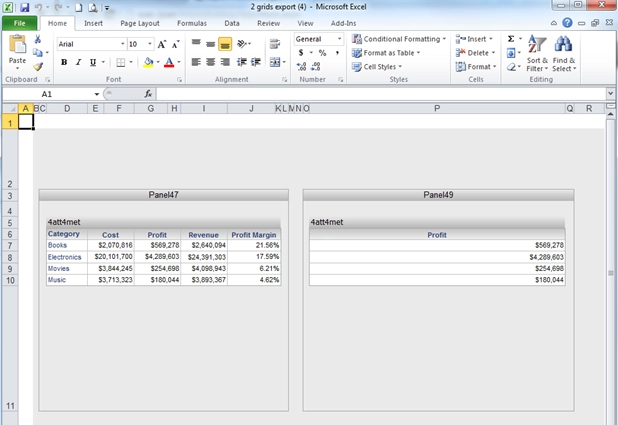
When a dashboard with 2 panel stacks, each with a grid, and one of the grids is configured to hide the Row columns, is exported to Excel, metric columns are missing in one of the grids in Strategy Web 9.x.
 
STEPS TO REPRODUCE:

  • Create 2 panel stacks and put the same grid consisting of 1 attribute and 4 metrics on each panel stack.
  • On the right grid, hide the attribute column by disabling the "Show Rows" option in the Grid properties as shown below:
ka04W000000OgFcQAK_0EM4400000026lm.jpeg
ka04W000000OgFcQAK_0EM440000002Qlz.png
  • Export the dashboard to Excel.
  • Notice that some metrics from the right grid are missing.
ka04W000000OgFcQAK_0EM4400000026ld.png

CAUSE:
This is a known issue in Strategy Web 9.x
 
ACTION:
Contact Technical Support for an update on this case.


Comment

0 comments

Details

Knowledge Article

Published:

June 16, 2017

Last Updated:

June 16, 2017