EducationSoftwareStrategy.com
StrategyCommunity

Knowledge Base

Product

Community

Knowledge Base

TopicsBrowse ArticlesDeveloper Zone

Product

Download SoftwareProduct DocumentationSecurity Hub

Education

Tutorial VideosSolution GalleryEducation courses

Community

GuidelinesGrandmastersEvents
x_social-icon_white.svglinkedin_social-icon_white.svg
Strategy logoCommunity

© Strategy Inc. All Rights Reserved.

LegalTerms of UsePrivacy Policy
  1. Home
  2. Topics

KB42727: Calendar selector month cannot be changed when user creates a date condition on a new custom group using the Custom Group Editor in MicroStrategy Web.


Community Admin

• Strategy


Calendar selector month cannot be changed when user creates a date condition on a new custom group using the Custom Group Editor in MicroStrategy Web.

SYMPTOM:
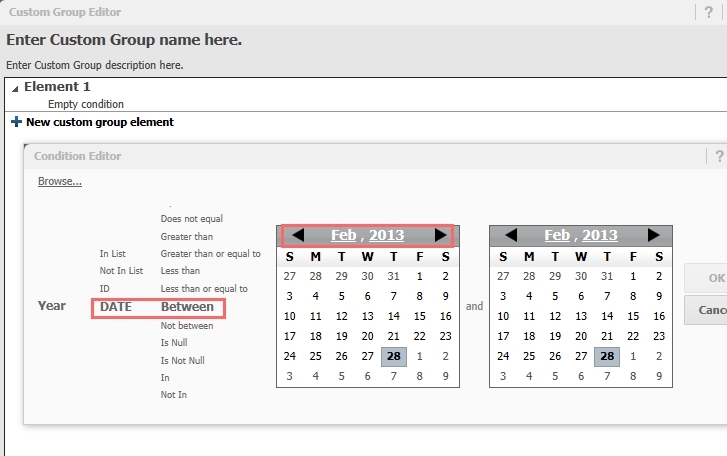
In Strategy Web, the Custom Group Editor allows users to create custom groups without going through the Strategy Desveloper interface. However, if the custom group is based on an attribute from of type Date, when using the condition "Between" and using the calendar selector to change the month, nothing happens; the month cannot be changed, like shown below:
 

ka04W00000148O7QAI_0EM4400000026nX.jpeg

 
Notice from the image above that the calendar picker has arrows to navigate to other months, however they do not react to the users' clicks. 
 
CAUSE:
This is a known issue in Strategy Web 9.4.1 - 10.3.
 
ACTION:
This issue has been addressed in Strategy Web 10.4. Upgrade to take advantage of the fix.
 
WORKAROUND:
Create the custom group through Strategy Developer for custom groups that rely on date conditions.
KB42727


Comment

0 comments

Details

Knowledge Article

Published:

May 30, 2017

Last Updated:

January 1, 2019