EducationSoftwareStrategy.com
StrategyCommunity

Knowledge Base

Product

Community

Knowledge Base

TopicsBrowse ArticlesDeveloper Zone

Product

Download SoftwareProduct DocumentationSecurity Hub

Education

Tutorial VideosSolution GalleryEducation courses

Community

GuidelinesGrandmastersEvents
x_social-icon_white.svglinkedin_social-icon_white.svg
Strategy logoCommunity

© Strategy Inc. All Rights Reserved.

LegalTerms of UsePrivacy Policy
  1. Home
  2. Topics

KB42731: On a dual axis graph in Visual Insight, the scale on the axis of a percentage metric displays from 0 to 1 instead of 0% to 100% and cannot be formatted when using MicroStrategy Web 9.4


Community Admin

• Strategy


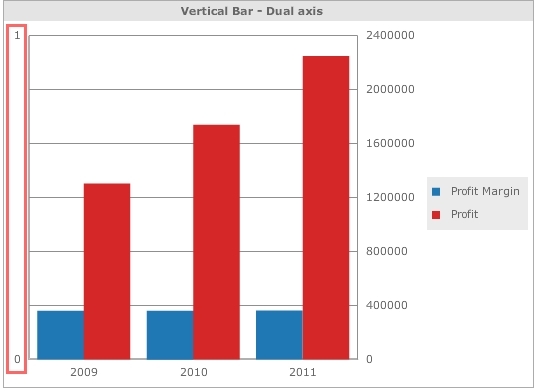
On a dual axis graph in Visual Insight, the scale on the axis of a percentage metric displays from 0 to 1 instead of 0% to 100% and cannot be formatted when using MicroStrategy Web 9.4

SYMPTOM:
Users may find that on a dual axis graph, when either axis contains a percentage metric, the axis scale is from 0 to 1 instead of the expected 0% to 100% range and cannot be changed via the graph properties in a Visual Insight analysis in Strategy Web 9.4, like shown below:
ka04W000001MKp0QAG_0EM4400000026nA.jpeg

This issue may occur on other dual axis graphs in Visual Insight other than the depicted vertical column graph.
CAUSE:
This is a known issue in Strategy Web 9.4
ACTION:
 
In Strategy 10, we will render all graphs using HTML5 code. Thus issue will not be applicable anymore.
WORKAROUND:
If possible, use metrics formatted as percentage together for the dual axis graphs and both axis will display formatted as percentage as expected.


Comment

0 comments

Details

Knowledge Article

Published:

April 1, 2017

Last Updated:

April 6, 2017