EducationSoftwareStrategy.com
StrategyCommunity

Knowledge Base

Product

Community

Knowledge Base

TopicsBrowse ArticlesDeveloper Zone

Product

Download SoftwareProduct DocumentationSecurity Hub

Education

Tutorial VideosSolution GalleryEducation courses

Community

GuidelinesGrandmastersEvents
x_social-icon_white.svglinkedin_social-icon_white.svg
Strategy logoCommunity

© Strategy Inc. All Rights Reserved.

LegalTerms of UsePrivacy Policy
  1. Home
  2. Topics

KB42739: How to change the bar type from clustered to stacked for a combination bar line graph in web?


Community Admin

• Strategy


How to change the bar type from clustered to stacked for a combination bar line graph in web?

Symptom

The user has created a combination bar line graph in web. The user would like to change the bar type from clustered to stacked using web.
 

Steps to reproduce

1. Create a report with the year attribute and the Cost, Revenue, and Profit metrics.
 

ka04W000000Oc4ZQAS_0EM4400000026n0.png

 
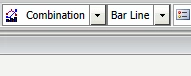
2. Run this report in web as graph type combination and sub-type bar line. The Bars will display as clustered bars as seen below
 

ka04W000000Oc4ZQAS_0EM4400000026mk.png
ka04W000000Oc4ZQAS_0EM4400000026n2.png

 
3. Change the graph type to vertical bar with sub-type stacked. This will change the bar type of the bars while the line still remains.
 

ka04W000000Oc4ZQAS_0EM4400000026mx.png
ka04W000000Oc4ZQAS_0EM4400000026mm.png

Comment

0 comments

Details

Knowledge Article

Published:

May 29, 2017

Last Updated:

May 29, 2017