EducationSoftwareStrategy.com
StrategyCommunity

Knowledge Base

Product

Community

Knowledge Base

TopicsBrowse ArticlesDeveloper Zone

Product

Download SoftwareProduct DocumentationSecurity Hub

Education

Tutorial VideosSolution GalleryEducation courses

Community

GuidelinesGrandmastersEvents
x_social-icon_white.svglinkedin_social-icon_white.svg
Strategy logoCommunity

© Strategy Inc. All Rights Reserved.

LegalTerms of UsePrivacy Policy
  1. Home
  2. Topics

KB42763: Tables remain in the System Objects\Temporary Table to Delete folder when trying to remove the table from the project using the Warehouse Catalog 9.2.X


Community Admin

• Strategy


Tables remain in the System Objects\Temporary Table to Delete folder when trying to remove the table from the project using the Warehouse Catalog 9.2.X

SYMPTOM:
 
When a table is removed from the project the table remains in the System Objects\Temporary Tables to Delete folder.
 

ka04W000000Oh4rQAC_0EM440000002Cvd.png

 
CAUSE:
 
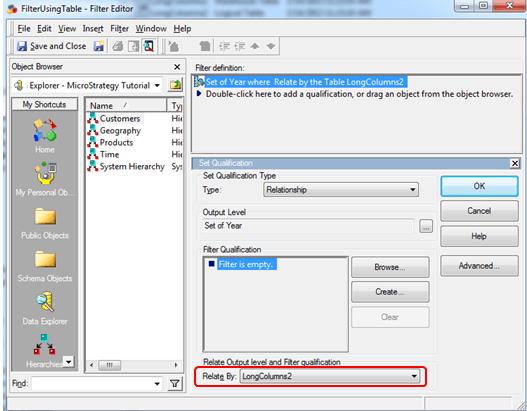
One possible cause for the table remaining in the Temporary Tables to Delete folder rather than being fully removed is that it still has dependents.  One documented scenario that can cause this is if the table has a dependent of a relationship filter in which the table is referenced by the "relate by:" section. 
 

ka04W000000Oh4rQAC_0EM440000002Cvc.png

 
If this is the case, the warehouse catalog in Strategy 9.2.x will still allow the table to be removed even though it has this object as a dependent.  After removing the table, it is then left in this Temporary Tables to Delete folder because of this lingering dependent object.
 
ACTION:
 
Contact Strategy Technical Support for an update on this issue.  Strategy Technical Support can assist in identifying any dependents of the table objects in this folder so they can then be successfully removed.


Comment

0 comments

Details

Knowledge Article

Published:

June 5, 2017

Last Updated:

June 5, 2017