EducationSoftwareStrategy.com
StrategyCommunity

Knowledge Base

Product

Community

Knowledge Base

TopicsBrowse ArticlesDeveloper Zone

Product

Download SoftwareProduct DocumentationSecurity Hub

Education

Tutorial VideosSolution GalleryEducation courses

Community

GuidelinesGrandmastersEvents
x_social-icon_white.svglinkedin_social-icon_white.svg
Strategy logoCommunity

© Strategy Inc. All Rights Reserved.

LegalTerms of UsePrivacy Policy
  1. Home
  2. Topics

KB42797: How to set reports subtotals to display a blank cell rather than zero in MicroStrategy 10.x


Community Admin

• Strategy


How to set reports subtotals to display a blank cell rather than zero in MicroStrategy 10.x

 
In order to set subtotals to display a blank cell rather than zero the following steps need to be taken:
 
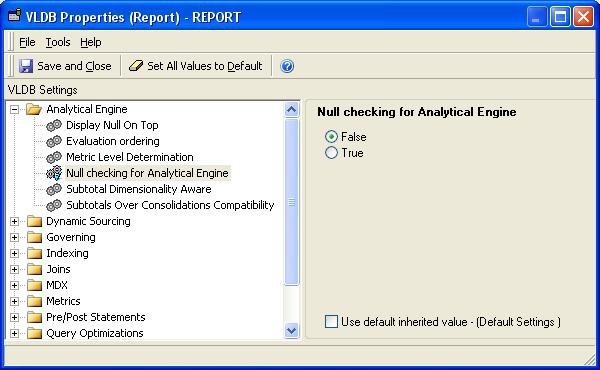
1. In Strategy Developer execute a report, go to  Data -> VLDB Properties ->Analytical Engine ->Null checking for Analytical
    Engine.Uncheck  "Use default inherited value - ( Default Settings)" and select "False" as shown below: 


ka04W000000OhAcQAK_0EM440000002CtU.jpeg


2. Save and Close the window. The grid cell will now display a blank cell instead of 0 for all subtotal values.


Comment

0 comments

Details

Knowledge Article

Published:

June 1, 2017

Last Updated:

June 1, 2017