EducationSoftwareStrategy.com
StrategyCommunity

Knowledge Base

Product

Community

Knowledge Base

TopicsBrowse ArticlesDeveloper Zone

Product

Download SoftwareProduct DocumentationSecurity Hub

Education

Tutorial VideosSolution GalleryEducation courses

Community

GuidelinesGrandmastersEvents
x_social-icon_white.svglinkedin_social-icon_white.svg
Strategy logoCommunity

© Strategy Inc. All Rights Reserved.

LegalTerms of UsePrivacy Policy
  1. Home
  2. Topics

KB42809: "No available tables were found in the warehouse catalog" error message appears when accessing Salesforce database instance in MicroStrategy Warehouse Catalog 9.4.1


Community Admin

• Strategy


This article describes an error "No available tables were found in the warehouse catalog" when accessing Salesforce database instance in MicroStrategy Warehouse Catalog 9.4.1

SYMPTOM:
When accessing Salesforce database instance in Strategy Warehouse Catalog 9.4.1 following error message appears:
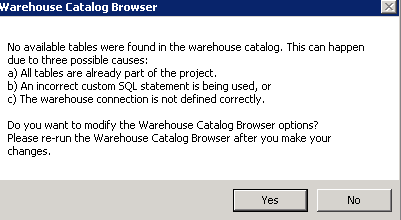
ka04W000000OaWXQA0_0EM440000002CuN.png

When accessing from DB Query Tool, the tables can be seen.
 
CAUSE:
This can be caused if the out-of-the-box DSN 'Salesforce' is used when connecting to Salesforce, which uses driver 'Strategy OpenAccess for Salesforce':

ka04W000000OaWXQA0_0EM440000002CuJ.png

 
ACTION:
Use Connectivity Wizard to create the DSN pointing to Salesforce, which will use driver 'Strategy ODBC Driver for Salesforce':
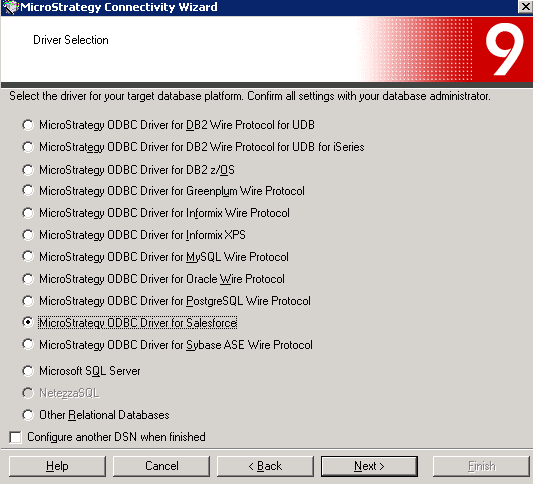
ka04W000000OaWXQA0_0EM440000002CuM.png


KB42809


Comment

0 comments

Details

Knowledge Article

Published:

June 8, 2017

Last Updated:

December 31, 2018