SYMPTOM:
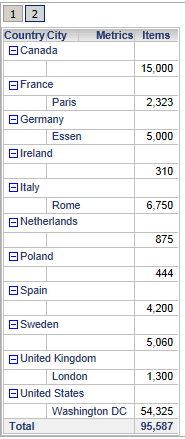
The results for reports displayed in Outline mode in Strategy Web change after upgrading to Strategy 9.3.0. These report results displayed in Outline mode will also differ between Desktop and Web for the same report in Strategy 9.3.0, as shown in the example below. Some metric values are missing for the report run in Web as shown on the left, where the same report run in Desktop displays all the metric values as shown on the right. If the same report is changed not to run in Outline mode the results will match between Desktop and Web.

CAUSE:
This is the symptom of an enhancement request introduced in Strategy Web 9.3.0 to remove rows that contain no attribute elements in Outline mode. The removal of rows that do not contain any attribute elements only occurs when a report is run in Outline mode in Strategy Web. In the example above, the empty row for a country such as Canada that has no children cities is removed in Strategy Web. The entire row is removed even if it removes metric values.
ACTION:
The behavior of Outline mode in Web can be changed back to the its pre Strategy 9.3.0 behavior so that rows that do no contain attribute elements are not removed. To do this, modify the sys_definitions.xml file located at WEB-INF/xml/sys_definitions.xml. Change the value for the property "hideEmptyNodesInOutlineMode" from it's default value of a "1" to a "0". The value "1" will enable the enhancement to hide attribute rows that contain no attribute elements and the value "0" will disable the enhancement.
If using Strategy Web ASP follow the instructions below.
1. Locate the sys_definitions.xml file at C:\Program Files (x86)\Strategy\Web ASPx\WEB-INF\xml
2. Right mouse click and select edit
3. Search for the the property "hideEmptyNodesInOutlineMode" to find the xml as shown below
<pr des="Hide Empty Nodes In Outline Mode" n="hideEmptyNodesInOutlineMode" scp="user_project" v="1" dt="boolean" />
<pr des="Hide Empty Nodes In Outline Mode" n="hideEmptyNodesInOutlineMode" scp="user_project" v="0" dt="boolean" />
<prs>
  <pr n="defaultThemeForAnalysis" v="1"/>
  <pr n="showHeaderBar" v="0"/>
</prs>
<prs>
  <pr n="defaultThemeForAnalysis" v="1"/>
  <pr n="showHeaderBar" v="0"/>
  <pr n="hideEmptyNodesInOutlineMode" v="0"/>
</prs>
ADDITIONAL INFORMATION:
The Strategy SDK allows you to customize the standard Strategy Web interface, and extend and integrate the Strategy business intelligence functionality into other applications. However, before changing the way Strategy Web products look or behave, it is helpful to understand how the application is built. For more information regarding the Strategy Web architecture or the process of customizing Strategy Web, please refer to Strategy Developer Zone (https://resource.microstrategy.com/msdz/).
To access the Strategy Developer Zone, you must have access to the Strategy Knowledge Base, you must have purchased the Strategy SDK, and you must be current on your Strategy maintenance agreement. If you are a US-based business and believe that you satisfy all three of these conditions but you do not have access to the Strategy Developer Zone, please contact Strategy Technical Support at support@microstrategy.com or at (703) 848-8700. If you are an international business, please contact Strategy Technical Support at the appropriate email address or phone number found at http://www.microstrategy.com/Support/ContactUs.asp.
CUSTOMIZATION WARNING:
This customization is provided as a convenience to Strategy users and is only directly applicable to the version stated. While this code may apply to other releases directly, Strategy Technical Support makes no guarantees that the code provided will apply to any future or previous builds. In the event of a code change in future builds, Strategy Technical Support makes no guarantee that an updated version of this particular customization will be provided. In the event of a code change in future builds, Strategy may not be able to provide additional code on this matter even though this customization is provided at this time for this specific build. For enhancements to this customization or to incorporate similar functionality into other versions, contact your Account Executive to inquire about Strategy Consulting assistance.
