EducationSoftwareStrategy.com
StrategyCommunity

Knowledge Base

Product

Community

Knowledge Base

TopicsBrowse ArticlesDeveloper Zone

Product

Download SoftwareProduct DocumentationSecurity Hub

Education

Tutorial VideosSolution GalleryEducation courses

Community

GuidelinesGrandmastersEvents
x_social-icon_white.svglinkedin_social-icon_white.svg
Strategy logoCommunity

© Strategy Inc. All Rights Reserved.

LegalTerms of UsePrivacy Policy
  1. Home
  2. Topics

KB42826: Unexpected error occurred. Contact 'xeqsupport' email distribution. error message appears when setting the Axis Path location within the XQuery Editor and Generator on MicroStrategy 9.x


Community Admin

• Strategy


Unexpected error occurred. Contact 'xeqsupport' email distribution. error message appears when setting the Axis Path location within the XQuery Editor and Generator on MicroStrategy 9.x

SYMPTOM:
Beginning in Strategy 9.x, the XQuery Editor and Generator exposes the Application Settings within the GUI.  Upon opening the Application Settings to edit them the Axis Path is set to 'UNINITIALIZED' as seen below:
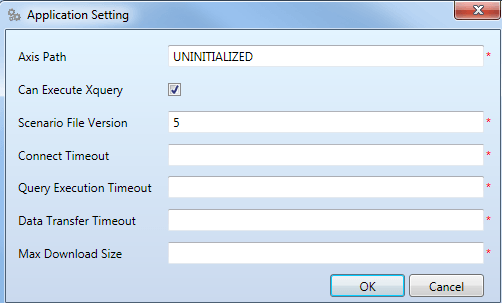
ka04W000000OfoRQAS_0EM440000002WgN.png

 
Secondly, if the value is manually modified to the desired location for the axis2.xml file, an error message is displayed and the settings will not be saved.

ka04W000000OfoRQAS_0EM440000002WgP.png


Unexpected error occurred. Contact 'xeqsupport' email distribution.

 
CAUSE:
The root cause of the issue is the Windows user not being able to read a registry key into the configuration file which the XQuery Editor and Generator uses to populate the Axis Path field.
 
ACTION:

  • Navigate to C:\Program Files (x86)\MicroStrategy\Desktop\XEG
  • Create a backup of the Strategy.XEG.WPFApp.exe XML Configuration file
  • Edit the Strategy.XEG.WPFApp.exe XML Configuration file
  • Find the <App Settings> key for "AxisPath" (It should look similar to the below)                                                                                                                   
  • Modify the value for "AxisPath" to be the location of the Axis2.xml file.  By default it is located at C:\Program Files (x86)\Common Files\Strategy.
  • Save and Close the file
  • Open the XQuery Editor and Generator and the Application Settings will reflect the change

Comment

0 comments

Details

Knowledge Article

Published:

July 21, 2017

Last Updated:

July 21, 2017