EducationSoftwareStrategy.com
StrategyCommunity

Knowledge Base

Product

Community

Knowledge Base

TopicsBrowse ArticlesDeveloper Zone

Product

Download SoftwareProduct DocumentationSecurity Hub

Education

Tutorial VideosSolution GalleryEducation courses

Community

GuidelinesGrandmastersEvents
x_social-icon_white.svglinkedin_social-icon_white.svg
Strategy logoCommunity

© Strategy Inc. All Rights Reserved.

LegalTerms of UsePrivacy Policy
  1. Home
  2. Topics

KB42829: "The selector requires a connection to MicroStrategy Web" message appears when modifying selections in an exported .mht file containing attribute as selector in MicroStrategy Web 9.x.


Community Admin

• Strategy


When using attribute as selector in Report Services Documents, it is not possible to modify the selections in exported .mht file format with MicroStrategy Web 9.4.1. The following message is displayed: "This selector requires a connection to MicroStrategy Web."

SYMPTOM:
When using attribute as selector in Report Services Documents, it is not possible to modify the selections in exported .mht file format with Strategy Web 9.4.1. The following message is displayed:
 

ka04W000001MKsrQAG_0EM4400000026mf.jpeg


This selector requires a connection to Strategy Web.
CAUSE:
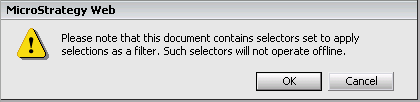
This error message is shown because the filtering selection feature is enabled for an attribute which is configured as selector in the exported document. When using filtered selections, Strategy Web retrieves only one specific subset of data from the Intelligence Server at a time. As a result, the exported .mht file contains only one dataset for one specific "attribute-as-selector" setting.
When exporting the dashboard to .mht format, the following message is shown:
 

ka04W000001MKsrQAG_0EM4400000026md.png


Please note that this document contains selectors set to apply selections as a filter. Such selectors will not operate offline.
 
ACTION:
1. In Strategy Web, edit the Report Services Document and right-click on the attribute to be used as selector.
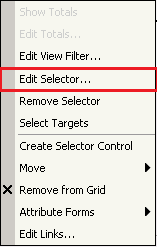
2. In the context menu, select the Edit Selector option as below:

ka04W000001MKsrQAG_0EM4400000026mb.png

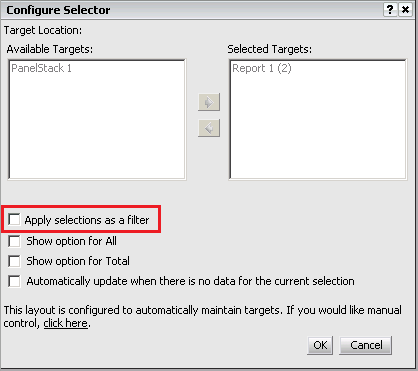
3. In the Configure Selector window, uncheck the Apply selections as a filter option as in the example below:
ka04W000001MKsrQAG_0EM4400000026mc.png

For reference on a similar issue where the Selector object is the one to be configured (not the attribute set as selector), check the following technical note:
KB33200: "The selector requires a connection to MicroStrategy Web" message appears when modifying selections in an exported .mht file in MicroStrategy Web 9.0.1.
Note: Starting in 10.x, and as explained in KB314273: Response regarding replacement of interactive PDF and MHT files, Strategy has also realigned its technology investments into a more robust and long running approach by implementing a proprietary portable file format, namely the .MSTR file format, which replaces the .mht export.


Comment

0 comments

Details

Knowledge Article

Published:

April 4, 2017

Last Updated:

April 4, 2017