Parallel execution of tasks in workflow are supported in Strategy System Manager, which can take advantage of a system’s processing capacity and increase its performance to complete tasks in a more faster way. However additional system resources are required every time that additional tasks are executed at the same time. Thus if the system cannot handle the additional processing requirements to complete all the tasks in parallel, the entire system can lose performance as this can slow down execution of the workflow.
In order to limit the number of parallel processes executing in System Manager, follow the steps below:
1) In Strategy System Manager, browse through menu View > Options.
2) Change the value of the parameter 'Maximum Concurrent Threads (min=2)' and type the maximum number of tasks that can processed at the same time as shown:
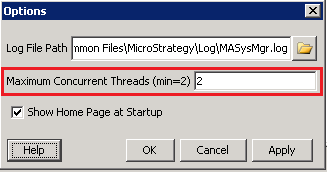
The Maximum Concurrent Threads default value for limiting parallel tasks in System Manager is either the number of CPUs for the current system or 2, whichever value is greater.
NOTE:
For further information on Maximum Concurrent Threads, refer to the Strategy System Administration Guide product manual.
