EducationSoftwareStrategy.com
StrategyCommunity

Knowledge Base

Product

Community

Knowledge Base

TopicsBrowse ArticlesDeveloper Zone

Product

Download SoftwareProduct DocumentationSecurity Hub

Education

Tutorial VideosSolution GalleryEducation courses

Community

GuidelinesGrandmastersEvents
x_social-icon_white.svglinkedin_social-icon_white.svg
Strategy logoCommunity

© Strategy Inc. All Rights Reserved.

LegalTerms of UsePrivacy Policy
  1. Home
  2. Topics

KB42869: How to use a report as filter to exclude data in Microstrategy Developer 9.x and later


Stefan Zepeda

Salesforce Solutions Architect • Strategy


How to use a report as filter to exclude data in Microstrategy Developer 9.x and later

This document explains a way to create a report filter to exclude data from the base report. 
 
 
EXAMPLE
 
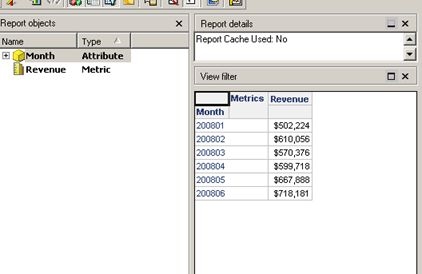
1. Create a report R1 with Month, Revenue and filter which contains the first 6 months in 2008.
 

ka02R000000kX6UQAU_0EM440000002CtY.jpeg

 
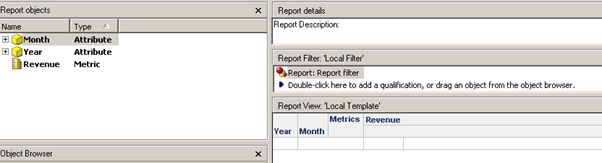
2. Create another report R2 with Year, Month, Revenue and use R1 as filter.


ka02R000000kX6UQAU_0EM440000002Ctb.jpeg

 
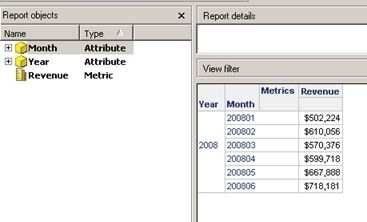
3. You will see that R2 still displays the first 6 months data.
 

ka02R000000kX6UQAU_0EM440000002CtW.jpeg

 
4.  In order to exclude the values, create another filter expression which will always be TRUE and combine it with the report-as-filter with "AND NOT".
  For example:  Report filter= "Year(ID) is not NULL" AND NOT R1 
This way the report-as-filter qualification is excluded.


Comment

0 comments

Details

Knowledge Article

Published:

April 10, 2017

Last Updated:

April 10, 2017